The Shopify Upsell Playbook: How to Build Flows That Lift AOV by 10-20%

Upsells are the easiest win for your Shopify store. People who are already in checkout, already buying from you, are much easier to sell to. Regular upsells at several key moments in your site’s (and app’s) checkout flow could drive a meaningful lift in AOV and bottom-line revenue with minimal effort.
Upsells are the easiest win for your Shopify store. People who are already in checkout, already buying from you, are much easier to sell to. Regular upsells at several key moments in your site’s (and app’s) checkout flow could drive a meaningful lift in AOV and bottom-line revenue with minimal effort.
An effective upsell strategy can be the difference between a Shopify store with the profits and cashflow needed to scale, and one just scraping by.
This is one of the most effective areas to leverage for increased revenue. A well-designed upsell flow converts at 10-20% post-purchase, with a documented 9.74% average AOV lift.
That’s free money - no new ad spend, no new channels, just additional revenue from people who you’ve already converted.
The brands seeing those numbers aren't running a single offer in a single place. They're running a coordinated set of offers across the customer journey, each tuned for the moment it appears in.
This guide covers how to build that system: the five moments where upsells work, the four levers that decide whether they convert, the mistakes that quietly tank performance, and the tech stack top Shopify brands use to run their upsell flows, in both website and app.
Want the latest insights into how 7, 8 and 9-figure brands are driving sustainable growth? That's what you get with our weekly newsletter, The Retention Edge. Subscribe for free today.
The Five Moments Where Shopify Upsells Convert
The first part to getting an upsell right is choosing the right moment to sell.
Every offer lives at a specific moment in the customer journey, and what works at one moment could fall flat at another.
Each moment has its own buyer mindset, its own constraints, and its own conversion ceiling. Your goal is to match the right offer to the right moment. Do that, and you’ll see a meaningful lift in conversions.
Here are the key moments to look at.
On the product page (PDP)
The buyer is researching. They've narrowed in on a product but haven't committed. This is the highest-relevance moment in the entire flow, because everything you suggest can be tied directly to the product they're already looking at.
What works here: bundles ("buy this with X for $Y off"), frequently bought together recommendations, product variants and upgrades (size, warranty, gift wrap), and complementary add-ons.
This is the moment that’s likely made billions in revenue for Amazon over the years.
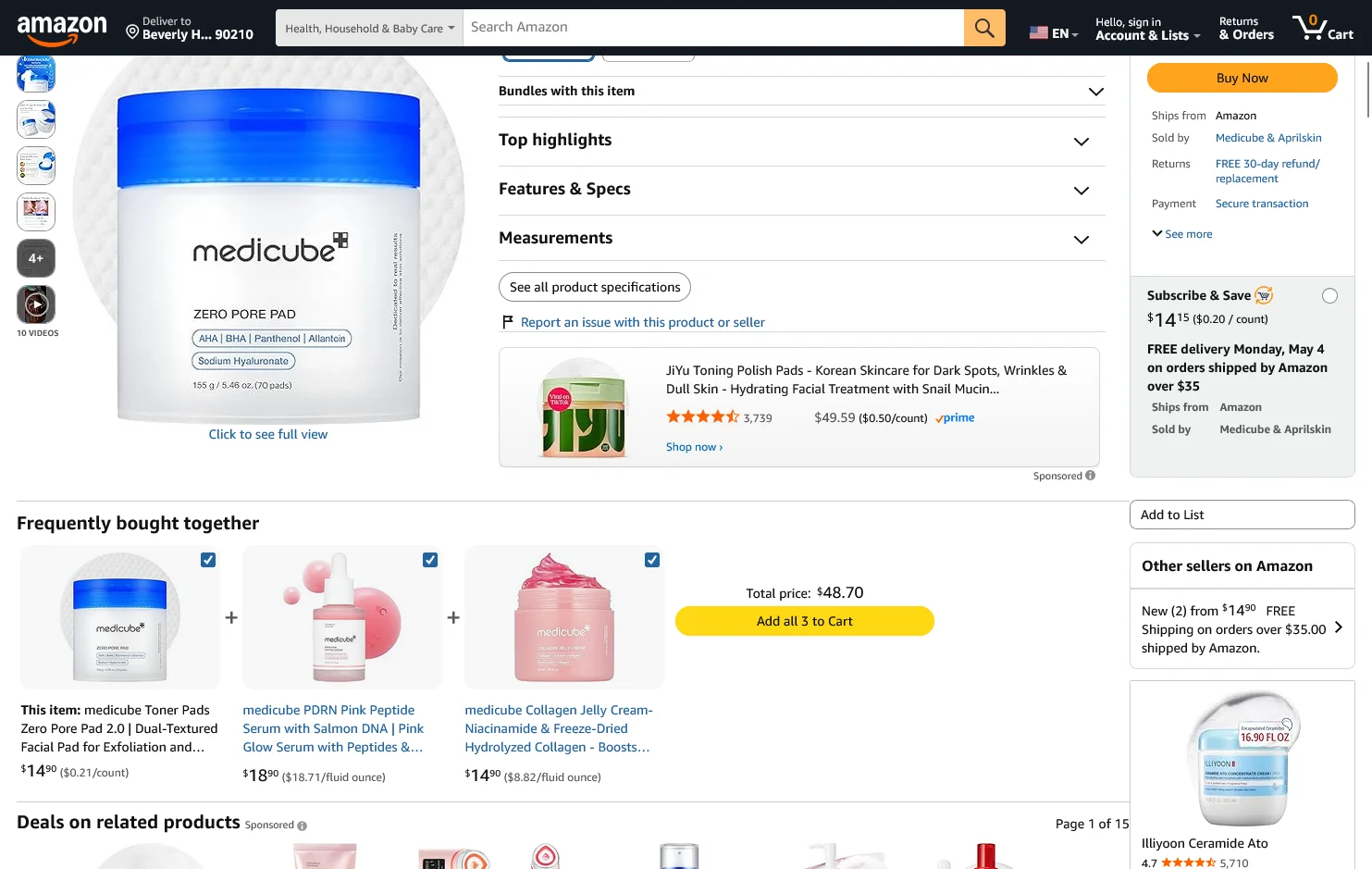
What doesn't work here: discount-led offers (you're undercutting the buyer's commitment to the main product) or unrelated cross-sells (you'll fragment their attention).
PDP upsells are the foundation of the flow. If you do nothing else, build these.
In the cart or cart drawer
The buyer has committed. They've crossed the line from "researching" to "buying." That mindset shift is exactly why cart upsells convert: there's no more deliberation, just optimization.
This is the right moment for low-friction add-ons (one click to add), free-shipping threshold nudges ("you're $12 away from free shipping"), volume discounts ("add one more, save 20%"), and last-minute related items.
The risk in cart upsells is friction. A pop-up that interrupts checkout costs you orders. A slide-cart drawer with one or two relevant offers built in does not. Design accordingly.
At checkout
Shopify's Checkout Extensibility, as well as various upsell apps, lets you show a single, tightly-relevant offer between cart and payment without breaking your conversion flow flow.
The keyword is single. Checkout is not the place for multiple offers. The buyer is one click from completing the order. One offer, one click to add, no friction. If you can't keep it that clean, skip the moment entirely.
Post-purchase
This is where most of the headline AOV lift comes from. The order is placed, the payment is processed, and you can show an offer that adds to the same order with a single tap, no re-entry of payment info.
Because the friction is essentially zero and the buyer is in peak post-purchase mood, conversion rates here are dramatically higher than at any other moment. The 10-20% conversion stat almost always refers to this specific surface.
What works: an add-on directly relevant to the product they just bought, ideally with a "won't see this again" framing. What doesn't: a discount on a future order (that belongs in email), a generic "you might also like," or anything that requires more than one tap.
On the thank you page
The order is complete. The job here isn't to extract another order on the spot. It's to set up the next one.
Thank you page slots that earn their keep: subscription opt-ins ("ship this every 30 days, save 15%"), referral program prompts, review collection, account creation, and SMS opt-in. These don't show up in upsell conversion stats, but they're the highest-leverage real estate in the entire flow for LTV.
The Four Levers That Decide Whether Your Upsells Convert
Across all five moments, conversion is decided by the same four levers. Most "the app didn't work" stories are really one or more of these getting pulled wrong.
Relevance
The offer has to belong to the same outcome as the main purchase. Buying a tent? Offer a footprint, not socks. The closer the conceptual link, the higher the conversion rate. Random "you might also like" suggestions trained by a generic recommendation engine are noise.
Timing
Each moment has its own offer type, as covered above. Showing a post-purchase-style discount on the PDP cheapens the main product. Showing a PDP-style bundle at checkout adds friction. Match the offer to the moment.
Friction
Every additional click costs roughly 30% of conversions. One-click is the standard. If your post-purchase upsell makes the buyer re-enter payment details, you've already lost. If your cart upsell opens a modal that hides the checkout button, you've lost.
Perceived value
"Add this for $9.99" is weaker than "save $12 by adding this now," which is weaker than "87% of customers also buy this." Stack the value framing: discount + scarcity + social proof beats any single one alone.
Five Mistakes That Kill Conversions on Upsells
Unfortunately, successful upsells aren’t as easy as just saying “would you like fries with that” to every customer.
Most brands running low-converting upsell flows are making a few common mistakes (which, luckily, are easy to right).
These are the patterns we see most often when brands tell us their upsell app isn't working.
- Same offer everywhere. The same "add a warranty" pitch on the PDP, in the cart, at checkout, and post-purchase. By the fourth time, it reads as desperation. Customers tune out the entire flow.
- Irrelevant cross-sells. The recommendation engine isn't tuned, no manual override exists, and the "frequently bought together" widget is suggesting items nobody actually buys together. Audit the actual outputs, not just the install.
- Discounting too early. Offering 10% off in the cart before the buyer has even checked out trains them to expect a discount on every order. Save the discount lever for post-purchase or future-order moments.
- Stacking too many offers. Three upsell pop-ups in one session is zero conversions. Pick two moments to start. Add more once those are tuned.
- Ignoring mobile. Most Shopify orders happen on phones. If your cart-drawer upsell is hidden behind a button on mobile, or your post-purchase offer renders as a fullscreen modal that's hard to dismiss, your data is going to look terrible. Test the flow on a phone before you ship.
The Tactical Upsell Playbook: Designing Your Flow
Theory aside, here's the sequence we'd recommend a Shopify brand follow when building an upsell system from scratch.
Step 1: Map your highest-AOV products to natural pairings
Before you install anything, pull a spreadsheet. List your top 20 products by revenue. For each one, write down the two or three items that genuinely complement it.
If you can't think of a natural pairing, that product probably doesn't belong in your upsell flow yet. Skip it.
This is the work most brands skip, and it's the reason their upsell app underperforms. The app can only suggest what you've told it to suggest.
Step 2: Pick two moments, not five
Don't try to cover the full journey on day one. Start with the two moments that have the highest leverage for most Shopify stores:
- PDP bundles (capture buyers while they're researching)
- Post-purchase one-click upsells (capture the highest-converting moment in the flow)
Get those two working at a meaningful conversion rate before you add cart upsells, checkout offers, or thank you page flows. Layering moments on top of an unproven base just multiplies the noise.
Step 3: Set guardrails before you launch
Three rules that prevent most upsell failures:
- Minimum cart value before any cart upsell triggers (avoids upselling on tiny orders)
- Exclusion rules for SKUs already on sale (no double-discounting)
- Frequency cap per session (one upsell pop-up per visit, max)
Most apps support all three. Most stores don't bother configuring them.
Step 4: Test the offer, not just the app
When something underperforms, the instinct is to swap apps. Almost every time, the problem is the offer, not the app.
A/B test the copy ("save $12" vs "free with order"), the discount depth (5% vs 15% vs no discount), and the product pairing itself. Most upsell apps include at least basic A/B testing now. Use it.
Step 5: Measure flow-level AOV, not app-level revenue
App dashboards report "revenue from upsells." Store dashboards report AOV. Always trust the second one.
Look at AOV for the segment exposed to the new flow vs a control segment, before and after. That tells you whether the flow actually moved your business. App-attributed revenue tells you whether the app is justifying its monthly fee, which is a different and less interesting question.
Extending Your Upsell Flow Into Your Mobile App
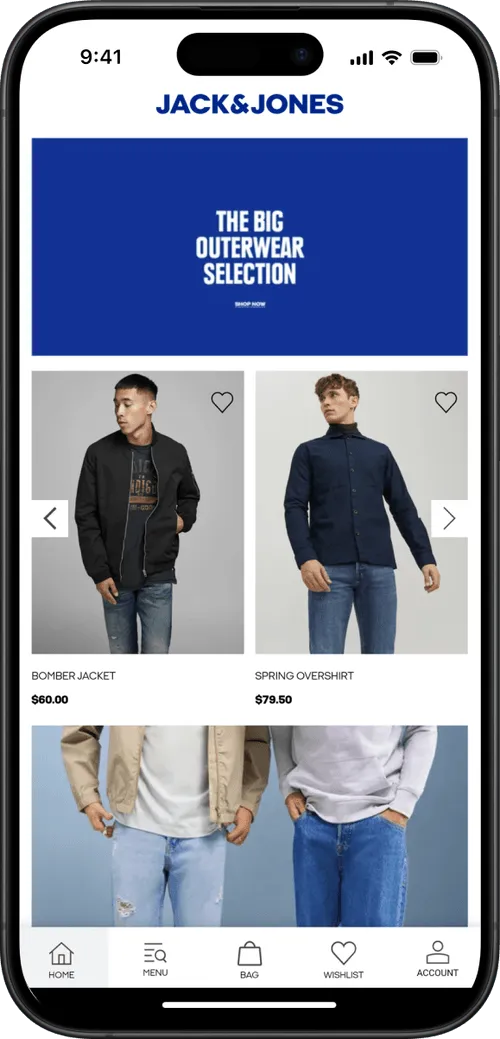
Here's something that catches most Shopify brands by surprise. You build a strong upsell flow on the web, it starts moving AOV, and then you launch a mobile app and that flow disappears.
That’s a huge miss. Your app users are your best customers. They’re the easiest to sell to, the easiest to push an upsell in front of. Stripping away your AOV upsells means losing money.
The reason this happens is simple: most Shopify mobile app builders don't carry over all your third-party Shopify apps.
If your upsell stack is ReConvert + iCart + AfterSell, your mobile app probably runs none of them. You’ve got a dialed-in upsell flow on the web, but vanilla checkout in your app.
MobiLoud takes a different approach. MobiLoud extends your existing Shopify website into a native mobile app, with every third-party app on your store working exactly the same in your app.
The same ReConvert post-purchase offer that converts at 12% on web carries over to your app, with no re-implementation, no custom development, no feature gaps.
You get all your AOV-driving upsells working in front of your most engaged users - where they’re likely going to drive an even bigger lift than they do on the web.
The Tech Stack Top Shopify Brands Use to Run Upsell Flows
Part of what makes upsells such a low-hanging fruit opportunity is Shopify’s app ecosystem, and how many tools there are that make it easy to build cart drawer upsells, PDP recommendations, post-purchase upsells and more.
Here are some examples of apps powering the upsell flows of brands we work with:
- ReConvert - A drag-and-drop post-purchase and thank you page builder. The most installed app in the post-purchase category, it also has a 4.9/5 rating and works for both Shopify and Shopify Plus. Website | Shopify App Store
- Instant Section & Page Builder - Visual builder for custom PDPs, bundle layouts, and cart-drawer experiences when you want full design control. Website | Shopify App Store
- AfterSell - Post-purchase upsells and thank you page customization, with a focus on one-click offers. Website | Shopify App Store
- Zipify OneClickUpsell - Pre and post-purchase one-click funnels with built-in A/B testing, built specifically for AOV optimization. Website | Shopify App Store
- iCart Cart Drawer - Slide-cart drawer with built-in upsells, free-shipping bars, and volume tiers. Website | Shopify App Store
Most brands don't need all of these. A practical starting stack is one PDP/cart tool plus one post-purchase tool.
On top of these apps, MobiLoud is the last piece of your upsell tech stack. MobiLoud lets you extend your high-converting upsells to an app, where customers naturally convert higher and spend more already.
A MobiLoud-powered app, running an optimized storefront with ReConvert/AfterSell/Zipify upsells, is the secret sauce behind an explosive boost in AOV.
Final Thoughts: Dialing In Your Upsell Strategy
The brands lifting AOV by 15% or more aren't necessarily using better apps than anyone else, or doing anything magical.
They're just running better flows, on more moments, on every device their customers shop on.
Your upsell stack should follow that order:
- Map the moments. Five exist; pick two to start.
- Build offers tuned to each moment, with relevance, timing, low friction, and stacked value.
- Set guardrails so the system doesn't fight itself.
- Pick the apps that fit the moments you've chosen, not the other way around.
- Carry the entire system across to mobile, where most of your orders are coming from.
If you do all five, the AOV lift compounds, and starts delivering the kind of growth you need to really scale your store.
FAQs

Convert your website into a mobile app