
The timeline to develop a mobile app, spanning everything from design to development, testing and publishing, can take anywhere from a few weeks to well over a year.
As with any software project, you can rush out something basic in a short time, or put more work in and dedicate a lot more time to the project.
If you’re exploring the idea of building a mobile app, understanding this is crucial. The mobile app development timeline affects the cost of your app, the time to market and payback timeline, as well as how good you look, as the decision maker, in front of your CEO or board.
At MobiLoud, we’ve put out over 2,000 mobile apps over the last decade. So we have a good idea of what the development process looks like, and how and where projects usually fall off the rails.
On the back of that experience, we’re going to share everything you need to know about how long it takes to build and launch a mobile app, and how you can optimize this timeline as best as possible.
Bottom Line Summary
- A simple mobile app or MVP typically takes around two to four months to build. Most custom mobile apps will take four to nine months, while more complex apps can take nine to 18 months or longer.
- The main phases include discovery, planning, design, development, integrations, testing, app store submission, and launch.
- Cross-platform development can reduce duplicated work, but it does not eliminate design, backend, testing, or app store requirements.
- The timeline is a lot quicker if you’re building from an existing website or web app. Turning your website into a mobile app can take around 4-8 weeks - as long as you choose an efficient way to build your app, that doesn’t require you to rebuild what you already have from scratch.
How Long Does It Take to Develop a Mobile App?
In most cases, developing and launching a custom mobile app takes somewhere between four and nine months.
That’s a broad range as it is, and there are plenty of projects that fall outside it. A relatively simple MVP may be ready in two to four months. A large, complex app with custom infrastructure, multiple user types and extensive integrations can take a year or longer.
Here’s a rough breakdown:
| Type of App | Typical Development Timeline |
|---|---|
| Basic prototype | 2-6 weeks |
| Simple MVP | 2-4 months |
| Standard custom mobile app | 4-9 months |
| Complex custom mobile app | 9-18+ months |
| Existing website converted into an app | 4-8 weeks |
These timelines cover more than just writing code. They include the full process of planning the app, defining its scope, designing the interface, building the frontend and backend, connecting integrations, testing the finished product and getting it approved by Apple and Google.
The less of that you have to do, or the more streamlined your processes for doing so, the faster you’ll be able to get your app live and in the app stores.
The Mobile App Development Process: Phase by Phase
To understand where the timeline comes from, it helps to break the project down into its main stages.
Not every app follows exactly the same process, and several phases will usually overlap. Design might continue while development begins, frontend and backend work often happen in parallel, and testing should take place throughout the project rather than being left until the end.
Still, most mobile app projects move through the following phases.
1. Discovery and Requirements
Typical duration: 1-4 weeks
The first phase is about working out exactly what you’re building, who it’s for and what the first version needs to do.
This usually involves:
- Defining the problem the app will solve
- Identifying the target users
- Researching competitors and similar products
- Deciding which platforms to support
- Listing the core features
- Separating essential features from future additions
- Identifying technical constraints and dependencies
- Setting an initial budget and timeline
The main output should be a clear product brief and a realistic scope for the first release.
This phase is easy to rush, especially when the team is eager to start building. But unclear requirements are one of the most common reasons app projects run over schedule.
If development is going on while you’re still debating features, or stakeholders have different ideas about what the app should do, it’s very likely that you’ll end up spending extra time rebuilding work that has already been completed.
For a straightforward app with a clear business case, discovery may only take a week or two. For a new product with multiple user types, complex workflows or unclear technical requirements, it can take a month or longer.
2. Scope Definition and Technical Planning
Typical duration: 1-3 weeks
Once you’re clear on the broad requirements, you can turn them into a practical development plan.
This phase usually covers:
- Mapping the main user journeys
- Defining the screens and features required
- Choosing between native, cross-platform or another development approach
- Planning the app architecture
- Choosing frameworks, databases and hosting infrastructure
- Identifying APIs and third-party integrations
- Breaking the project into development milestones
- Estimating the work required for each phase
The most important question at this stage is how much of the underlying product already exists.
If the app needs a new backend, database, admin system and APIs, all of that must be factored into the timeline.
If the app is built on an existing ecommerce site, SaaS or web app, some of the technical foundation may already be in place. You’ll then just need to assess how much of that can be reused vs how much you need to rebuild, and what has to be done for the app-specific layer.
3. UX and UI Design
Typical duration: 3-8 weeks
Once the scope and technical approach are clear, the next step is to design how the app will look and work.
This phase covers both user experience design and visual interface design.
UX design focuses on how users move through the app, complete tasks and find the information they need. UI design focuses on the visual layer: the colors, typography, buttons, icons, spacing and other elements users see on screen.
The process will usually include:
- Mapping user flows
- Planning the app’s information architecture
- Creating wireframes for the main screens
- Designing reusable interface components
- Applying the company’s branding
- Building an interactive prototype
- Reviewing and approving the final designs
For a relatively simple app, this may take around three or four weeks. A larger app with multiple user types, complex workflows or dozens of unique screens can easily require two months or more.
The design process usually moves from user flows and wireframes to polished screens and an interactive prototype. This gives you a chance to test the structure and find problems before development begins, when changes become more expensive.
4. Backend Development
Typical duration: 6-16+ weeks
The backend is everything that powers your app behind the scenes. It stores data, manages user accounts, processes requests and connects the app to other systems.
Depending on the product, backend development can include:
- Databases
- User authentication and permissions
- Business logic
- Content management
- Payments and subscriptions
- Order or inventory management
- Admin tools
- APIs
- Analytics and notifications
This is usually one of the longest parts of building a mobile app from scratch.
If the app needs a completely new backend, you’ll need to design and build the infrastructure before a lot of features can work properly. That can add several months to the overall development timeline, particularly for apps with multiple user types, complex permissions or large amounts of data.
The timeline is shorter when an existing backend is already in place. For example, an ecommerce app may be able to connect to an established store, while a SaaS app may reuse the same accounts, data and business logic as the web product.
However, an existing backend doesn’t always mean the app can connect to it immediately. The dev team may still need to create or extend APIs, update authentication flows and rebuild integrations for the mobile frontend. This is rarely as simple as just writing a few lines of code.
5. Mobile Frontend Development
Typical duration: 6-16+ weeks
Frontend development is where the work produced in the design phase gets turned into the part of the app users actually see and interact with.
This includes:
- Navigation and menus
- Account creation and login
- Product, content or dashboard screens
- Search and filtering
- Forms and settings
- Checkout or payment flows
- Push notifications
- Deep linking
- Camera, location or other device features
- Accessibility and analytics
The timeline depends on the number of screens, the complexity of the interactions and whether the app is being built separately for iOS and Android.
Building two fully native apps generally takes longer because each platform requires its own implementation and testing. Cross-platform frameworks such as React Native or Flutter can reduce duplicated work by allowing much of the code to be shared.
Cross-platform development doesn’t eliminate platform-specific work entirely, though. You still need to account for differences between iOS and Android, test across devices and operating systems, and handle any native features or integrations.
Frontend and backend development will usually happen in parallel, so these timelines shouldn’t simply be added together. One team might build the interface while another develops the APIs and infrastructure it relies on (assuming you have a multi-person team working on your app).
6. Integrations
Typical duration: 2-8+ weeks
Most mobile apps need to connect with other systems, such as payment providers, ecommerce platforms, CRMs, analytics tools, support software, subscription platforms or internal business systems.
The time it takes to build these integrations depends on how many are involved, how well documented their APIs are and how much customization you need to make to get them to fit with your app.
A straightforward integration with a stable, well-documented API may only take a few days. Older internal systems, heavily customized platforms or incomplete APIs can add weeks or even months.
Integration work usually happens alongside frontend and backend development rather than as a completely separate phase. Even so, every connection adds more implementation and testing work, as well as another dependency that can delay the project.
7. Quality Assurance and Testing
Typical duration: 3-8 weeks
Testing is where the team checks that the app works as intended across different devices, operating systems and real-world conditions.
This usually includes:
- Functional testing
- Usability testing
- Performance testing
- Security testing
- Integration testing
- Device and operating system compatibility
- Accessibility testing
- Beta testing with real users
- Regression testing after fixes and updates
Mobile testing can be particularly time-consuming because the app needs to work across different screen sizes, hardware capabilities, operating system versions, permissions and network conditions.
Ideally, testing should take place throughout development, not just at the end. Developers usually test individual features as they’re built, followed by a more concentrated QA phase before launch.
The timeline for testing depends almost entirely on the complexity of your app, and the amount of interactions and integrations that could cause problems. It also depends on how many issues are found - as every fix then needs to be re-tested to make sure it works, and that nothing else broke as a result of it.
8. App Store and Google Play Submission
Typical duration: Several days to 2 weeks
Once your app is built, working, and thoroughly tested, it needs to be prepared for submission to Apple’s App Store and the Google Play store.
This usually involves:
- Creating the app store listings
- Writing the app description
- Preparing screenshots and preview assets
- Adding privacy and data-use information
- Configuring age and content ratings
- Providing login details or test accounts for reviewers
- Uploading the final builds
- Responding to any review feedback
The review itself may only take a few days, but it’s worth allowing extra time in case your app is rejected or more information is requested.
Common causes of delays include incomplete privacy disclosures, broken login flows, unclear subscription terms, missing test credentials and features that don’t meet store guidelines.
Apple’s submission process tends to be particularly troublesome, and many first-time app developers have found the back and forths with their app review team a source of frustration.
9. Launch and Post-Launch Stabilization
Typical duration: 2-6 weeks
Publishing the app isn’t the end of the project. The first few weeks after launch are usually spent monitoring performance, fixing issues and making improvements based on real user behavior.
This may include:
- Monitoring crashes and technical errors
- Fixing bugs missed during testing
- Reviewing analytics and user feedback
- Improving onboarding and navigation
- Resolving device-specific issues
- Updating app store listings
- Releasing the first app updates
The amount of post-launch work depends on how thoroughly the app was tested and how users respond once it’s live. Even a well-tested app can encounter edge cases that only appear at scale or on specific devices.
Mobile App Development Timelines by App Type
The phases above apply to most mobile app projects, but the total timeline can vary significantly depending on what you’re building.
A basic MVP with one core function is very different from a complex marketplace, banking platform or social network. The more users, workflows, integrations and custom infrastructure involved, the longer the project is likely to take.
Simple Prototype: 2-6 Weeks
A prototype is designed to show how an app might look and work, rather than being a complete, production-ready app.
It might include:
- A small number of screens
- Clickable user flows
- Mock data
- Limited functionality
- Little or no working backend
Prototypes are useful for validating an idea, testing a user journey or presenting the concept to investors and internal stakeholders. But turning it into a secure, stable product takes further development and testing.
Simple MVP: 2-4 Months
A minimum viable product includes the smallest set of features needed to solve the core user problem and gather feedback from real users.
A relatively simple MVP may have:
- One main user type
- A focused set of features
- Standard account and login functionality
- A limited number of integrations
- A basic admin system
- A straightforward interface
The biggest factor is how strictly the team controls the scope.
It’s common for an app to be described as an MVP while still including multiple user roles, payments, chat, subscriptions, advanced analytics and several integrations. Once that happens, the timeline will move closer to that of a full custom app.
Standard Custom Mobile App: 4-9 Months
Most professionally developed business and consumer apps fall into this range.
A standard custom app might include:
- A fully customized interface
- User accounts and profiles
- A dedicated backend
- Several core workflows
- Third-party integrations
- Payments or subscriptions
- Push notifications
- Analytics
- Support for both iOS and Android
This timeline allows for proper planning, design, development, testing and launch preparation without requiring unusually complex infrastructure.
Complex Mobile App: 9-18+ Months
More complex apps can take a year or longer to reach their first stable public release.
Examples include:
- Marketplaces
- Social networks
- Financial or healthcare apps
- On-demand service platforms
- Real-time messaging products
- Large ecommerce apps
- Products with several different user types
- Apps that need extensive offline functionality
These projects often require advanced security, complex permissions, real-time data, large-scale infrastructure and integrations with multiple internal and external systems.
The first release could still launch with a reduced feature set, but building the complete product can become a multi-year process.
How Long Does Cross-Platform App Development Take?
Cross-platform development lets you build iOS and Android apps from a shared codebase, using frameworks such as React Native or Flutter.
This can reduce the amount of duplicated frontend work compared to building two completely separate native apps. Features can often be developed once and released across both platforms at roughly the same time.
Going cross-platform might cut down the frontend development time by close to half.
However, you still need to:
- Define the product and its requirements
- Design the interface and user experience
- Build or connect the backend
- Set up integrations
- Test across iOS and Android devices
- Handle platform-specific behavior
- Submit the app to both stores
- Maintain the app after launch
There might also be parts that need to be developed differently for each OS, such as integrations with device APIs, UI quirks, or third-party SDKs that behave differently on iOS and Android.
Cross-platform development, in most cases these days, is the way to go when building an app - at least compared to fully “native” development. But it doesn’t eliminate all the hard, time-consuming work involved in launching a mobile app - it just shortens it somewhat.
How Long Does It Take to Turn a Website Into a Mobile App?
The biggest disruption to the typical mobile app development timeline is when you’re not building an app from scratch - but converting an existing website into a mobile app.
Doing this, you can get your mobile app live in as little as 4-8 weeks.
This is the better approach for quite a lot of mobile app projects. If the app isn’t a new product being built from the ground up - such as an app for an ecommerce site - you don’t need to do a lot of the scoping, design and backend development work that takes up the bulk of a typical project.
Instead of starting with a blank slate, you already have:
- A working frontend
- An established design and brand
- User accounts and authentication
- Product or content management
- Checkout and payments
- Business logic
- Analytics
- Third-party integrations
- Proven user journeys
You could still rebuild it all for the app - new UI, new checkout, new integrations with each of the tools your business uses. Many do, in the hope of unlocking performance benefits from a fully "native" build.
But for projects like ecommerce apps, this is one of the biggest mistakes you can make. Rebuilding things that already work just adds unnecessary work, which creates more cost and longer time to market.
How MobiLoud Shortens the App Development Timeline
MobiLoud turns your website into a mobile app, letting you launch your own app significantly faster than a custom build from scratch.
It’s the perfect way to build an app for ecommerce brands (and other high-touch online brands) who have a website that already does the majority of what their app should do.
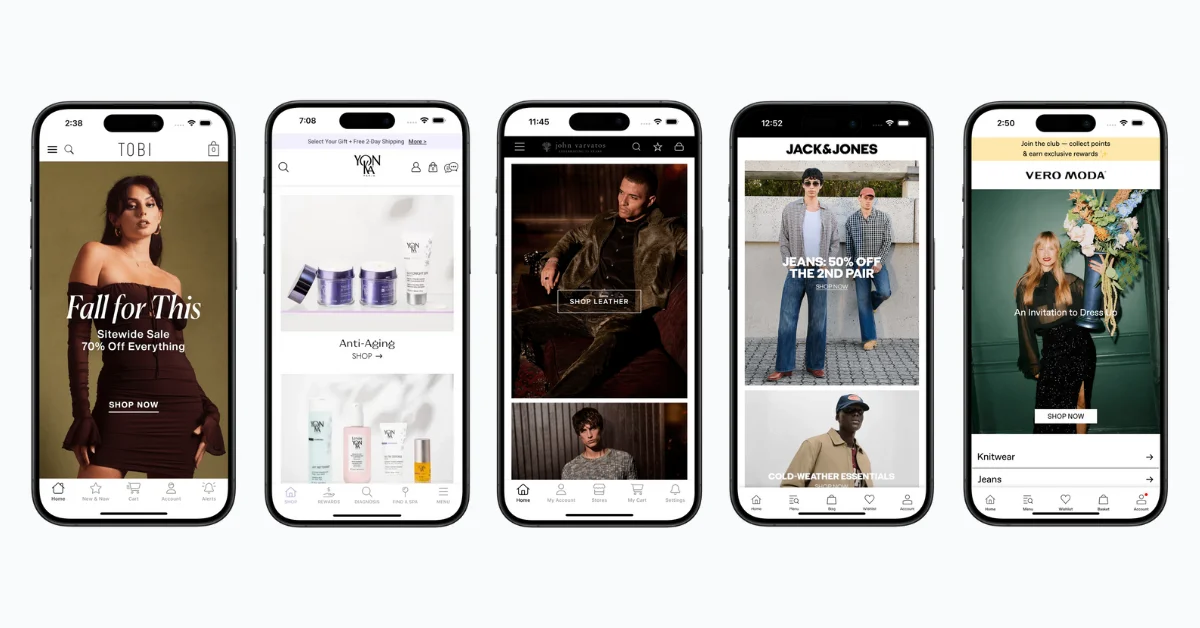
Instead of starting from square one: scoping your requirements, designing a UI from scratch, then building custom integrations for everything on your site; you reuse everything that already works, and build the native features you need on top of that.
You’re also benefiting from a proven process, worked out over 10+ years of building mobile apps.
MobiLoud has helped over 2,000 businesses launch mobile apps, and in that time, the process has been streamlined at every stage, from integration work to testing to the app store submission process.
"No one believed we'd have an app in under a month, but within two weeks, it was done.”
- Ahmed Yousef, Director of Ecommerce at Pharmazone
That’s how you’re able to get a full-featured, fully tested mobile app in eight weeks or less, when a similar project, built from scratch, would likely keep a team of developers busy for six months or more.
Final Thoughts
The mobile app development timeline can take a number of different shapes. A simple MVP may take a few months, while a complex custom app can take a year or more once you account for planning, design, development, integrations, testing and app store approval.
For any serious mobile app, if you’re building it from square one, you’ll need to expect a long time from start to finish.
The only way to accelerate this timeline is with MobiLoud, and converting what you already have into a real, working, high-quality mobile app.
Using your existing site as the foundation of your app lets you launch within eight weeks, instead of the months-long timeline that most mobile apps demand.
If you’re looking to launch an app for your online brand and want to see how MobiLoud works, get a free consultation and we’ll walk you through everything.