A shopper puts something in their cart on your website in the morning. That evening they open your app to check out, and the item is a different price (or it's gone).
Or the sale banner they saw earlier is nowhere to be found. The bundle builder they used to make their perfect product bundle isn’t on the PDP.
To them, it feels like they walked into a different store.
This is one of the most important things to get right when you build a mobile app for your store. Your web and app channels need to be consistent, and in sync. If they’re not, you may as well be opening another Shopify account and starting a new brand.
Read on and we’ll explain why this is so important, and expand on the implications of getting it wrong - before sharing the easiest way to make sure this never becomes a problem for you.
Your App Is Another Way to Buy From You, Not a Second Business
A branded mobile app is another channel for your business to reach and sell to customers.
The risk, when building your app, is that it becomes a whole new business to run.
New storefront; new content; new order flows and inventory management. It becomes like an offshoot of your brand.
No one sets out to do it this way. It’s an unintended result of building a new channel from the ground up, in a separate codebase from your website.
You’re recreating your website from scratch, and things start to drift apart. Some features don’t work the same way. You decide to “improve” some things, do them differently in the app. You try to make the app unique, a new channel that stands on its own.
And while your intentions are on point, the result of putting together a brand new, unique experience can be detrimental to your users - and your team.
The App Can Be Better Than Your Site, But Never Worse
Many think that a mobile app has to offer a hundred new features, and it needs a brand new UI, to justify its existence.
But often, in making this the goal, you end up breaking the one rule you can’t break when launching a mobile app.
Bottom line: your app needs to be at least as good as your website.
Here’s what David Cost, VP of Ecommerce at Rainbow Shops (a global ecommerce & retail brand with over 1,200 stores) told us:
"Our apps never had any functionality or usability beyond the web experience. The reason to have an app is not to have something that isn't on the website, but for people who prefer that way to access Rainbow content. The app needs to be at least as functional as the website. It doesn't need to be better than the website, but the user experience can't be worse."
The last part is the baseline requirement for an ecommerce app. Here it is again:
“The app needs to be at least as functional as the website. It doesn't need to be better than the website, but the user experience can't be worse.”
Think about it; if your app is missing things that are on your website… why would anyone use it?
There’s already friction in having to go to the app store and download your app. Your customers aren’t going to go through that, and keep the app installed, if it doesn’t do everything your website can do.
The Operational Burden of Managing Two Storefronts
Your customers aren’t the only ones who will be upset if your app and website are out of sync.
Your team will be too. The further the two channels drift apart, the harder it is to manage.
You’re maintaining two sets of content, two design systems, two storefronts. Your team ends up doing everything twice.
It becomes a nightmare to keep track of. Product updates, new product launches take twice as long. Someone needs to make sure a change in the app doesn’t contradict something on your site, or vice versa.
There’s also a new codebase to maintain, which in all likelihood will require a new team. You’re either stretching your existing team thinner, or adding headcount to keep the app running.
What “Sync” Means (Three Ways Your Site and App Need to Be Connected)
Now let’s get into what “in sync” really means, in practical terms.
It can be broken down into three layers, all of which are important:
- Data
- Experience
- Operations
Your app and site need to have a shared source of truth for data, a shared customer experience, and a shared operational workflow.
Let’s learn more about what goes into each one of these layers.
Data: One Inventory, One Order History, One Account
This layer is the most important.
All your store data and logistics should link back to one shared source of truth.
Things like:
- Orders
- Inventory/stock levels
- Customer accounts
You can’t be managing different stock levels for your app and your website, or asking customers to create a different account to log into the app.
Most of the time, if you’re using an ecommerce mobile app builder, this won’t be a problem. These app providers are made to integrate with your store on the backend, so these things all sync across.
But it’s why building an app with a provider that doesn’t support your ecommerce platform is a non-starter. You need one shared backend. And you need it to be reliable; not something that takes a few minutes to update, and in that time you’ve sold five units of something that should have shown as out of stock.
Experience: It Should Feel Like the Same Store
The next layer is the customer experience. It should feel like the same brand, the same store, whether someone’s shopping on your app or your site.
Design, branding, messaging, product details, features - these should all be consistent.
It’s a disorienting experience if someone happens to log into your site on their computer, then a little while later opens your app, and sees something completely different.
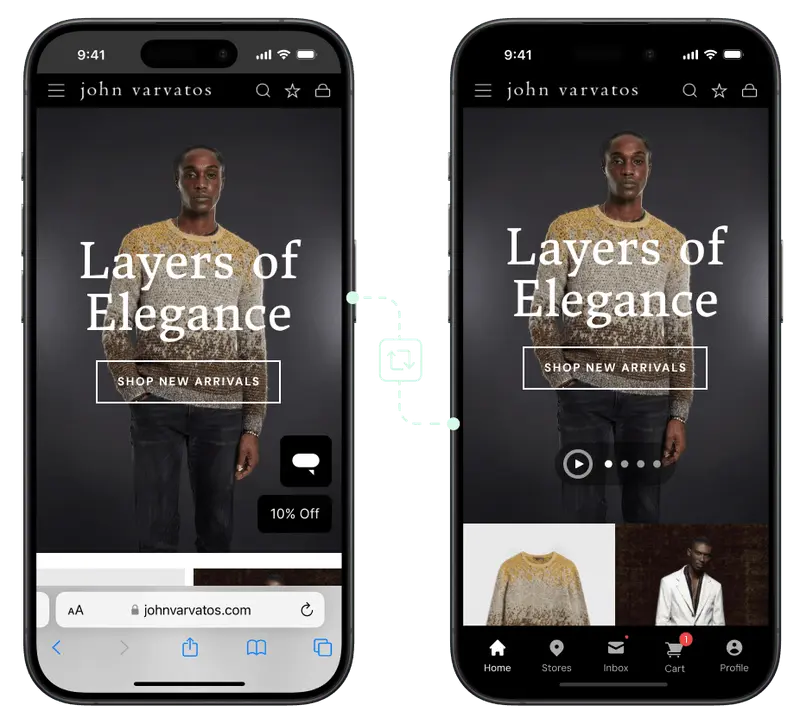
That doesn’t mean both channels have to be exactly the same. And it doesn’t mean you can’t add app-exclusive features. But remember back to the big rule of thumb for your app: it should not be missing features that exist on your site.
That includes small things, like product variants, subscriptions and payment options. You cannot have a situation where a certain shade isn’t available through the app, or you can’t buy on subscription through the app.
That’s a death sentence for the channel.
Operations: Update Once, Not Twice
The third layer is behind the scenes. It’s how your team manages both channels.
Ideally, and especially when your user experience is already consistent across channels, you should be able to update most things once, and have them go live everywhere.
Think all the small changes you make to your site on a daily basis. Promo banners, pricing, product descriptions, CRO tweaks.
If all these changes have to be made twice, it’ll wear your team down, slow everything else down.
The result, from what we’ve seen, is usually one of two things. Either people put off or forget to make these changes (and your web and app experiences drift apart) - or you decide against making changes that could boost revenue, because you don’t want to deal with the dance of updating each channel to make sure everything’s still in sync.
"We considered building our own apps internally, natively for iOS and Android, but even though we could do that, we couldn't really maintain it moving forward in a really easy way. We don't have the resources to... keep our app synchronized with our website and all that stuff."
- David Chamberlin, Lead Developer at Tadashi Shoji
In Sync Doesn't Mean Identical
None of this means your app has to be a pixel-for-pixel copy of your site. In sync and identical are different things. You can, and often should, tailor the app to the people using it, as long as you never make it the lesser experience.
Some differences are worth making:
- App-only pricing or perks that reward people for installing
- App-exclusive pages, or a homepage built specifically for app shoppers
- A layout and flow tuned to how people actually browse in an app
What these have in common is that they're additive. They give app users a reason to prefer the app, which is the entire point. Vary the experience up, never down.
Better is fine. Different is fine. Worse is not.
Why Your App and Site Fall Out of Sync
While most of this is common sense, many brands still struggle to keep their website and app in sync.
The reason: architecture.
Most ecommerce apps are built as a second storefront. They have their own codebase, which exists separately from your website.
They’re connected on the backend via platform APIs (like Shopify’s Storefront API), which makes sure the cardinal sin of separate data systems doesn’t happen. But apart from that, it’s a completely separate surface.
This is true with custom builds, as well as the majority of no-code app builders. With app builders, while they’re built to create an app for your site, you still essentially have a separate CMS for the app.
The backend is fairly well integrated, but it’s a different frontend, built with their builder, and managed through their platform.
It’s not in sync by default. It’s your responsibility to try and keep it in sync. And depending on how custom your store is, that won’t always be possible.
A Better Model: Build an App From Your Existing Site
You can avoid all out of sync problems, and launch a unified web + app experience by default, by not building the app as a separate system in the first place.
MobiLoud extends your existing site, features, data and all, into a custom mobile app that runs on the same tech stack.
You manage everything through your website (whether that’s Shopify, Magento, BigCommerce, or even a custom build).
The foundation is all the same; same design, features, small improvements and business logic as your website. And it’s combined with a native layer that adds all the app-specific features you need on top of your site (push notifications, native navigation, a place on the home screen, app-exclusive experiences).
It’s automatically synced on the backend, because it’s not a separate channel, linked by an API - it’s the same channel, shipped to two different surfaces.
That hits all the requirements for syncing your website and app.
- Data all feeds to one place.
- Features and design systems are literally the same, and work across both channels by default.
- Changes to shared elements only need to be made once (even a redesign or rebrand goes live in both channels at the same time).
It’s a unified experience, by default (with the flexibility to extend and customize the app experience beyond the website).
"We don't need to manage a separate app codebase, any update on our website is instantly reflected in the app."
- Damien Smith, Head of Operations at BoozeBud
Final Thoughts
Your app and your website are one store. The problem is, it’s easy for the two channels to end up feeling like separate businesses.
When you stand up an app, you want something that adds to your business. More revenue from your repeat customers, stronger loyalty and retention.
You don’t want another job, a separate store to maintain.
Building an app with MobiLoud is the best way to avoid this.
You get two channels, optimized for separate customer archetypes, but still inherently on-brand and consistent, at all times.
Building an app this way is significantly easier to manage, better for your brand, and also for your business.
If you want to see what this approach could look like for your store, get a free preview of your app and see it laid out in an interactive demo.
You’ll see how easy it is to launch a full-featured native app, that doesn’t take a whole new team to maintain.