SFCC Composable Storefront & Mobile Apps: How They Work Together

Salesforce Commerce Cloud's Composable Storefront (PWA Kit) builds a fast, React-based progressive web app for your storefront. To go a step further and get your SFCC store into the App Store and Google Play, you need to turn your SFCC store into a true mobile app. MobiLoud is the most seamless path: it extends your Composable Storefront into native iOS and Android apps with every feature intact, no second codebase required.
Salesforce Commerce Cloud's Composable Storefront (PWA Kit) builds a fast, React-based progressive web app for your storefront. To go a step further and get your SFCC store into the App Store and Google Play, you need to turn your SFCC store into a true mobile app. MobiLoud is the most seamless path: it extends your Composable Storefront into native iOS and Android apps with every feature intact, no second codebase required.
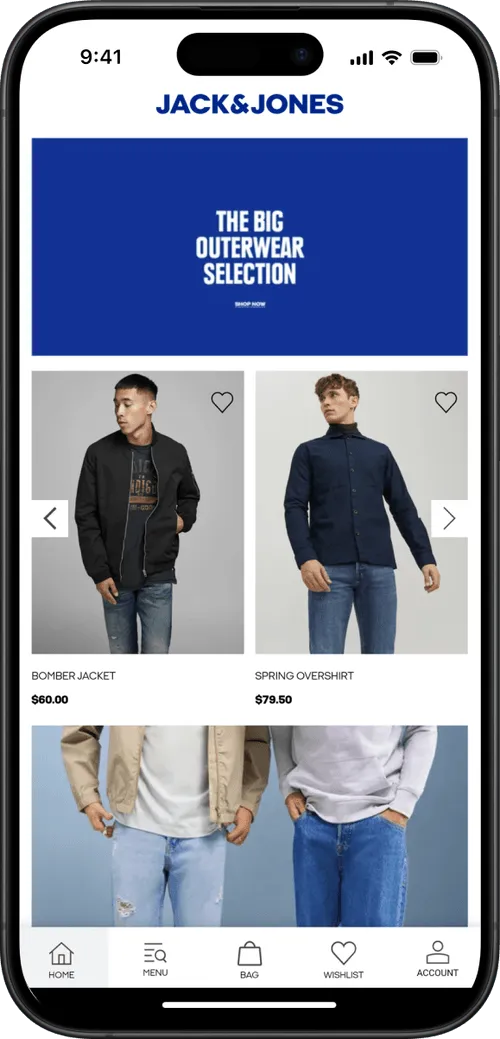
If you're running Salesforce Commerce Cloud, you have a ton of great mobile commerce tools at your disposal.
SFCC’s Composable Storefront is one example. It gives you the power to build a fast, mobile-optimized, modern user experience.
But the crucial step that’s missing: letting you launch a full, “real”, mobile app.
This article explains how far the Composable Storefront gets you, where a PWA stops and a native app begins, and how SFCC brands create native apps without duplicating their frontend investment.
What the SFCC Composable Storefront Actually Builds
The Composable Storefront is Salesforce's headless commerce frontend framework for B2C Commerce.
It bundles three components:
- PWA Kit: An open-source React/TypeScript framework for building storefront UIs. This is the code your developers write in.
- Managed Runtime: Salesforce's serverless hosting platform that deploys and scales your storefront.
- SCAPI (Shopper Commerce API): The API layer connecting your storefront to B2C Commerce's backend (product catalog, cart, checkout, customer accounts, inventory).
The output is a Progressive Web App: a server-side rendered React application delivered through a web browser. It includes service workers for caching, a web manifest for add-to-home-screen prompts, and fast page loads from server-side rendering.
A Progressive Web App is a strong upgrade over a standard website, particularly now, when the majority of ecommerce traffic comes on mobile.
However, it’s not the same as launching a true native app. A mobile app gets your brand in the App Stores, it gives you native push notifications, and a more intuitive (and thus more often used) path to install.
PWAs don’t.
Salesforce's own Trailhead documentation acknowledges the distinction, noting that native apps "make sense when you want to drive higher engagement with your most loyal customer base."
Where the PWA Stops and a Native App Begins
The Composable Storefront delivers a strong mobile web experience. For many SFCC brands, that raises the question: is a PWA enough, or do you need an actual native app?
The difference matters for ecommerce brands focused on retention and repeat purchases.
Distribution
A PWA lives in the browser. Customers access it through a URL, and may add it to their home screen if prompted.
A native app lives in the App Store and Google Play, where customers discover it through search, get prompted to install it through smart banners, and see it alongside every other app on their phone.
Installability
PWAs can be “installed” in a way, by the user adding it to their home screen.
However, in practice, this rarely happens. It’s hard to find the option to add a PWA to your home screen (when did you last do this?), and is not as intuitive (or trusted) as a one-click install from the App Store.
Push Notifications
This is the biggest practical gap.
Native apps send push notifications through Apple's APNs and Google's FCM, which reach virtually all opted-in users, at any time. Your notifications light up the user’s home screen, whatever they’re doing, making them one of the most direct, highest-visibility channels in ecommerce.
PWAs can send push notifications. However, they’re run via the browser. Which means they’re only sent when the browser is running, their appearance is different, and they’re limited on iOS.
Simply, PWA push notifications don’t pack the same kind of power as native push.
The Bottom Line on PWA vs Native
A PWA is an improved mobile website. A native app is a retention and engagement channel.
They serve different purposes, and for SFCC brands with repeat-purchase customers, the native app is where lifetime value compounds.
How to Create a True Native App for Your SFCC Store
SFCC’s Composable Storefront is a great foundation for a native app.
It doesn’t get you all the way there - but it lets you create a mobile-friendly web store that can be easily extended into a mobile app.
There are a few ways you can go about this; from using your existing storefront to power the app, or using SFCC’s APIs to connect your backend to a custom frontend.
Let’s have a look at how these options work now.
Extend Your Composable Storefront into a Native App
Here’s the most seamless option for most SFCC brands: take the web storefront you've already built and extend it into native iOS and Android apps.
MobiLoud is the best way for Salesforce Commerce Cloud stores to launch a true mobile app.
With MobiLoud, your Composable Storefront, the React application your team has invested in building and optimizing, becomes the foundation of native apps published in the App Store and Google Play. Every customization, third-party integration, and feature carries over because the app is powered by your actual storefront.
What you get:
- App Store and Google Play listings with your branding
- Native push notifications via OneSignal/Klaviyo
- Native navigation (tab bar, splash screens, deep linking)
- App-exclusive experiences (app-specific pages, discounts, products)
- Automatic updates: Changes to your Composable Storefront appear in the app without an app store update
This approach works especially well with the Composable Storefront because of how it extends your website, instead of rebuilding it.
Your storefront is already a high-performance React application. The mobile web experience you've built translates directly into the app experience. You're not starting from scratch; you're adding a native distribution layer on top of work you've already done.
"The app's been invaluable to us. The cost we're paying versus what we're getting back is tenfold."
-- Nick Barbarise, Director of IT at John Varvatos (SFCC, 10x higher revenue per app user vs mobile web)
The timeline to launch is around 30 days, and the cost is likely in the low-four figures per month (see full details here). That makes it a far more cost-effective option than building a fully custom app (which can cost $250K+ upfront, and another six figures per year to maintain).
Build a Custom Native App Against SCAPI
If you want to go all out and build a fully custom native app, you can do that too.
You can use React Native, Flutter, or native Swift/Kotlin to build a completely separate frontend that connects to SCAPI for commerce data. This gives you full control over every pixel in your app, albeit with some trade-offs:
- Cost: $150,000-$500,000+ for the initial build, depending on complexity
- Timeline: 6-12+ months to launch
- Ongoing maintenance: A dedicated mobile development team managing a second codebase alongside your Composable Storefront
- Feature parity risk: Every feature, promotion, or redesign on your web storefront needs to be separately built in the native app
- SI coordination: Your SFCC implementation partner and your mobile development team need to stay aligned on API changes and commerce logic
A custom app could be an option if you need deep native functionality, or if you already have mobile app development expertise in-house.
Realistically, though, the app you get from a custom build isn’t going to be that much different from what you’d get if you extended your existing site into an app with MobiLoud. However, you’d be paying 100x the price to do it.
Stay PWA-Only
If getting into the app stores isn't a priority right now, the PWA capabilities built into the Composable Storefront may be sufficient as a starting point.
You get fast mobile web performance, offline page caching via service workers, and add-to-home-screen capability.
It’s an upgrade for your website; and if you’re still working on getting more customers, or you have a relatively low share of customers shopping on mobile, it’s a solid starting point.
SFCC Mobile App Approaches: Side-by-Side Comparison
Final Thoughts
The SFCC Composable Storefront and a native mobile app aren't competing choices. They're complementary layers.
The Composable Storefront handles your web storefront with a modern React architecture, fast performance, and the flexibility of headless commerce. A native app handles the retention channel: App Store presence, push notifications, and a permanent home screen icon for your most valuable customers.
MobiLoud bridges the two. It extends your Salesforce Commerce Cloud storefront into native iOS and Android apps with every feature, customization, and integration intact.
No second codebase, no separate development team, and updates to your Composable Storefront appear in the app automatically.
The app can be a powerful asset for your brand - apps deliver a major boost to repeat sales, and brands with their own app typically see outsized revenue contributions from their app users.
"Only about 5% of users are on the app, but they generate around 50% of sales."
-- Junior Couture team
Ready to take your Composable Storefront to the next level?
Book a free strategy call and we’ll show you your SFCC storefront as a native mobile app, and walk you through the process step-by-step.
FAQs

Convert your website into a mobile app