If you run an ecommerce brand on Adobe Commerce (formerly Magento), you need to know about PWA Studio.
Adobe positions it as the modern way to build your storefront: a React-based, headless frontend that replaces the aging Luma theme with something faster and more mobile-friendly.
On paper, it sounds like it solves your mobile problem. Your site looks and feels like an app. Pages load fast. Users can even "install" it on their home screen.
But there's a meaningful gap between an app-like website and an actual mobile app. Your mobile strategy can’t stop at PWA Studio.
This article breaks down what PWA Studio actually does, what it doesn’t, and how to think about PWAs as part of your full mobile strategy.
What Is Adobe Commerce PWA Studio?
Adobe Commerce PWA Studio is a set of open-source developer tools for building a progressive web application (PWA) storefront on top of Adobe Commerce.

A PWA is a website built with modern web technologies that mimics some behaviors of a native app - like offline caching and home screen installation - while still running in the browser.
In practice, PWA Studio replaces your store's frontend entirely. Instead of the traditional Luma theme (PHP templates, server-rendered pages), it gives you a headless architecture: a modern React application that communicates with your Magento 2 backend through GraphQL APIs, with the frontend fully decoupled from the backend.
Here are the core pieces that make up your site’s architecture:
- Venia - a reference storefront and UI component library you can customize or build on top of
- Peregrine - React hooks and logic for things like cart management, checkout, and product data
- Buildpack - build tooling (Webpack, Babel) configured for Commerce-specific needs
- UPWARD - a proxy server that sits between your storefront and backend, handling routing and server-side concerns
The result is a single-page application that behaves more like a web app than a traditional ecommerce site.
Navigation feels instant because there are no full page reloads. Content loads progressively. The interface is responsive and fluid.
It's a genuine architectural upgrade over Luma, which was released in 2015 and shows its age. If you're still running a Luma storefront, PWA Studio represents a meaningful step forward for your mobile web experience.
Benefits of PWA Studio
PWA Studio solves real problems for Adobe Commerce merchants - especially now, when mobile is steadily increasing as the most common way people shop online.
Speed and Performance
PWA Studio storefronts are fast. The headless architecture means your frontend isn't weighed down by the monolithic Magento backend on every page load.
Code splitting, lazy loading, and service worker caching (service workers are background scripts that manage network requests and enable offline functionality) keep things snappy.
Riddle's Jewelry saw a 47% increase in web traffic and a 5.7% boost in conversion rate after migrating to a PWA storefront. Accent Group (Platypus Shoes) reported a 14% lift in AOV and a 68% increase in add-to-cart rate.
Faster page loads translate directly to lower bounce rates and higher conversion.
App-Like Mobile Experience
This is the headline feature. PWA Studio makes your mobile web experience feel closer to a native app:
- Smooth navigation - page transitions without full reloads
- Offline support - service workers cache key assets so the site works (at least partially) without a connection
- Add to home screen - on Android, users can install the PWA to their home screen with an app icon
- Responsive design - purpose-built for mobile-first layouts
For brands whose mobile web experience was previously a sluggish, desktop-shrunk Luma theme, this is a big upgrade.
It Works With Your Existing Backend
PWA Studio doesn't require you to migrate off Adobe Commerce. Your catalog, pricing, promotions, customer accounts, and integrations stay exactly where they are. The frontend just communicates with them differently (through APIs instead of direct template rendering).
This also means your existing Adobe Commerce extensions for things like PageBuilder, Live Search, and Product Recommendations integrate with PWA Studio.
Modern Developer Experience
If your development team has been working with Luma's PHP/Knockout.js templates, PWA Studio brings them into the modern frontend ecosystem: React, GraphQL, component-based architecture. It's a more productive and maintainable codebase long-term.
What Are the Limitations of PWA Studio?
Make no mistake, PWA Studio is an extremely valuable part of the Adobe Commerce ecosystem.
It has some “limitations”, though calling them limitations perhaps isn’t fair, as these are more like misconceptions of what a PWA is, and what it can do.
The main thing to realize: a PWA is not a replacement for a real mobile app.
You're Not in the App Store
A PWA is a website. It doesn't appear in the Apple App Store or Google Play Store.
The App Store and Play Store are where consumers go to find, install, and manage the apps they use daily. If someone searches for your brand in the App Store, you won't show up. You can't run App Store Ads. And you don't get the credibility signal that comes with having a published, rated app.
Apple is explicit about this. Their App Store Review Guidelines (section 4.2) require that apps "include features, content, and UI that elevate it beyond a repackaged website."
You can't simply submit a PWA to the App Store. It will get rejected.
No Native Push Notifications
Push notifications are one of the most powerful features of a mobile app. They’re a direct, virtually cost-free marketing channel, that shows up on the customer’s lock screen.
And PWAs don’t have push notifications (at least, not the kind that matters).
PWAs have their own form of web push notifications, but that's a separate channel from native app push. They're different technologies with different behaviors, different opt-in flows, and fundamentally different reach.
Native app push is a direct line to your customer's lock screen, managed through the operating system. It's the channel that powers abandoned cart recovery, back-in-stock alerts, flash sale announcements, and personalized re-engagement for every major ecommerce app.
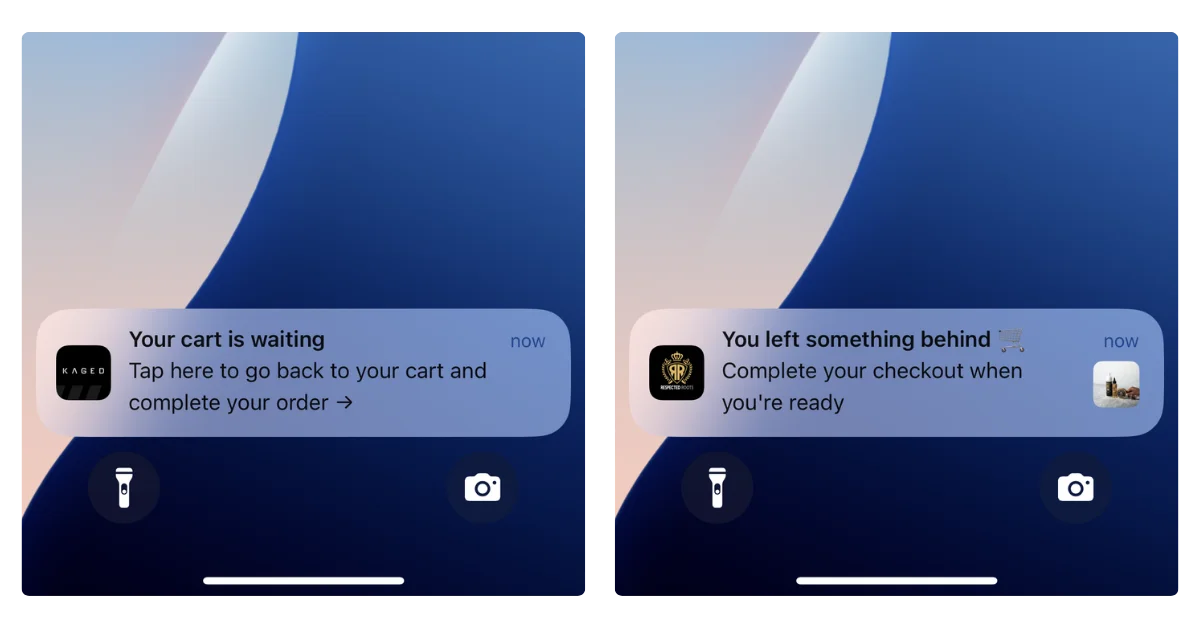
PWAs don't have access to this channel at all. They can only send web push notifications - sent through the browser, with limited reach on mobile.
Web push has its uses, but it doesn’t compare to the power of native push notifications.
Limited Native Device Access
PWAs run inside the browser engine. That means they're limited to what the browser allows, which on iOS in particular, isn't much:
- No biometric authentication for streamlined checkout (Face ID, fingerprint)
- No Apple Wallet or Google Wallet integration for loyalty cards and passes
- No deep AR capabilities for product try-on experiences
- No NFC, Bluetooth, or hardware sensor access
- No background processing - on iOS, the service worker gets suspended when the PWA isn't in the foreground
These limitations are set by the platform (primarily Apple), not by PWA Studio. No amount of frontend engineering can work around them.
Storage and Reliability Concerns
PWAs store data using browser storage mechanisms (IndexedDB, Cache API).
On iOS, this storage can be evicted by the operating system under storage pressure. That means a user's cached data, offline content, or local state can disappear without warning.
Native apps get persistent storage that lasts until the user explicitly uninstalls the app.
Limited Conversion Rate for “Installs”
PWAs can be “installed” - which is not technically an install, but instead means the user adds a shortcut to their home screen to launch your PWA (really your website).
However, this doesn’t tend to have great results in practice.
It’s not super clear how to add a PWA to the home screen (most users don’t know this is an option; and are unlikely to go through the steps to do it).
On Android, PWAs can trigger an install prompt that asks the user to add the app to their home screen. It's not as visible as an App Store listing, but it's something.
On iOS, there is no install prompt. The user has to know to open the Share menu, scroll through options, and tap "Add to Home Screen."
The reality? Few people will add your PWA to their home screen - far less than the number who would download your native app.
Learn more: PWAs vs Native Apps - the Complete Breakdown
Is Adobe Commerce PWA Studio Still Supported?
As of 2026, PWA Studio is still supported, but it's worth knowing where it sits in Adobe's roadmap.
Adobe has shifted its strategic focus to Edge Delivery Services (EDS), a newer storefront architecture built on document-based authoring and edge computing.
EDS is what Adobe is actively investing in and promoting as the next-generation Commerce frontend.
PWA Studio isn't deprecated. The most recent release was v14.5.0 in February 2025, and Adobe has never dropped support for any of its storefronts, including Luma from 2015.
You can expect continued maintenance and compatibility updates. But the framework is unlikely to see major new feature development.
It's also worth noting that PWA Studio isn't the only headless frontend option for Magento stores. Alternatives like Vue Storefront (now Alokai) and Hyva Themes have gained traction, particularly among developers who found PWA Studio's React-heavy architecture challenging to customize.
If you've already built on PWA Studio, this isn't a reason to panic. Your storefront will continue working. But it's context worth having as you plan your broader technology investments.
Curious about whether your Alokai or Hyva storefronts can work as a native app? Find the answers here.
Can a PWA Replace a Native Mobile App?
No. But here's the thing that often gets lost in the PWA vs native app conversation: it's not either/or. They’re not “competitors”.
A PWA and a native app serve different audiences at different stages of the customer journey. Here's how they compare for ecommerce:
| PWA (via PWA Studio) | Native Mobile App | |
|---|---|---|
| App Store / Play Store listing | No | Yes |
| Native push notifications | No (web push only) | Yes |
| Biometric login | Limited | Yes |
| Offline browsing | Partial (cached pages) | Full |
| Background processing | No (iOS suspends service workers) | Yes |
| Apple / Google Wallet | No | Yes |
| Home screen install | Manual on iOS, prompted on Android | Installed from app store |
| Deep linking | Limited | Full |
PWA Studio handles your mobile web experience. When someone clicks a Google result, an Instagram ad, or a link in an email, they land on a fast, app-like web storefront.
That first impression matters, and PWA Studio delivers it well.
A native app handles retention and repeat engagement. Once a customer has bought from you and downloaded your app, you have a direct channel to their home screen and lock screen.
Native push notifications, native navigation UI, an icon on their home screen, a listing in the app stores. This is where you build LTV.
Mobile apps convert at 3-4x the rate of mobile web for ecommerce, and the gap is driven largely by the retention mechanics that only native apps provide.
The brands getting mobile right aren't choosing between a PWA and a native app. They have both.
Where MobiLoud Fits In: Turning Your PWA Studio Storefront into a Native App
If you've invested in PWA Studio (or you're planning to), you've already built the bulk of your UX. You have a fast, modern, app-like frontend. Your mobile web experience is solid.
MobiLoud takes that investment and extends it into a real native app in the App Store and Play Store.
There's no rebuild. No new platform to manage.
MobiLoud works with your existing Adobe Commerce storefront, whether it's built on PWA Studio, Luma, or a custom headless frontend.
Your app stays in sync with your website in real time because it's powered by the same underlying web infrastructure.
Here’s what you gain:
- App Store and Play Store presence - your brand shows up where customers look for apps, with ratings, reviews, and discoverability
- Native push notifications - a real, direct channel to your customers' lock screens for abandoned cart recovery, promotions, and re-engagement
- Native device capabilities - push, smooth native navigation, deep linking, a real home screen icon
- A fully managed service - MobiLoud handles the build, submission, updates, and App Store compliance, so your team isn't maintaining a separate native codebase
For brands already running PWA Studio, MobiLoud is particularly complementary. You've built an app-like UI already - MobiLoud makes it an actual app.
It’s basically a no-brainer, once you’ve built your powerful mobile storefront with PWA Studio, to use MobiLoud to convert it into a native app.
Want to see how it works? Have questions? Book a free consultation now and discuss it with our mobile app experts.
Wrapping Up
PWA Studio is a great way to modernize your Adobe Commerce storefront and deliver a better mobile web experience. If you're still on Luma (or just running a vanilla front end), it's a worthwhile upgrade.
But if your goal is a comprehensive mobile strategy that includes a real presence in the App Store and Play Store, native push notifications as a retention channel, and the engagement advantages that only native apps provide, PWA Studio alone won't get you there.
The good news is you don't have to choose. Build your fast, modern web storefront with PWA Studio. Then extend it into a native app with MobiLoud.
Book a free 1:1 strategy call now to dive deeper, and see why turning your PWA Studio storefront into a native app makes so much sense.