If you've started looking into building a mobile app for your store, you’re going to have a lot of buzzwords thrown at you.
Apologies for that.
You’re especially likely to see this when it comes to the architecture of your app. Like people launching into big debates on native vs hybrid ecommerce apps, or hammering home the point that your app has to be “native”, when you don’t know what “native” really means.
This article will clear it up for you - and explain whether there’s really a difference, and if so, whether that difference really matters.
What is a "Native" and "Hybrid" Ecommerce App?
Native and hybrid are two ways to describe the underlying architecture of an app (typically a mobile app).
Here’s the difference.
Native Apps: Code Specific to Each Platform
A native app is built using the native coding language of a specific platform.
For mobile apps, that means Swift or Objective-C for iOS apps, and Java or Kotlin for Android apps.
You’ll have separate builds, with their own, unique codebase, for each platform. This means higher quality, since each build can be tailor made for all the intricacies of each operating system. It also means higher cost and overhead, because there are unique codebases to be maintained separately from one another.
Hybrid Apps: Web + Native Code, Working Together
A hybrid app is an app that uses web and native code together.
The outer layer is native: it installs from the App Store or Google Play and it sits on the home screen. It’ll also have some native features, like push notifications, some native UI elements.
Much of the core content and features of the app, though, are built with the same web technologies that power websites (HTML, CSS, and JavaScript).
This means you can have one codebase, powering the majority of three channels: web, iOS and Android.
It also means some minor quality differences compared to a fully native app. But as we’ll find out soon, these differences may not be worth a whole lot.
The Blurry Line Between Native and Hybrid
There’s a little more complexity to the native vs hybrid question.
For a start, “hybrid” is not a scientific definition. It’s a broad category, which moves depending on who you’re talking to.
There are also cross-platform frameworks like React Native and Flutter, which use one language to ship to both iOS and Android (but require a fully separate build vs the web).
These apps often get lumped in with native; though, depending on who’s giving the speech and where their agenda lies, they’ll sometimes be lumped in the hybrid camp.
Strip away all the agendas, all the fluff and buzzwords, and the one most important takeaway is this:
Native and hybrid apps (and cross-platform) are all “real” mobile apps. It’s not like native vs PWA (where a PWA, or Progressive Web App, is not a true mobile app you can download from the app store).
Whether you build with Swift, React Native or a hybrid approach, you’re still getting a real mobile app, in every sense of the word.
Upsides and Trade-Offs of Native Apps
Now let’s look at the pros and cons of each approach; starting with native apps.
Native development gives you max performance, and the deepest access to native device features - at a cost.
On the upside:
- Top performance for demanding work. When an app has to render heavy graphics or process data in real time, native does this the fastest.
- Full access to device features. These frameworks are literally built for each specific device, so they’re able to tap into device features easily (biometric features, camera, etc).
- Fine-grained control. For complex, animation-heavy interfaces, native gives developers the most precise control over how every pixel looks and moves.
On the downside - you’re looking at higher cost and complexity.
- Two separate codebases, two teams. iOS and Android are built and maintained separately, each needing its own specialists.
- Higher cost and longer timelines. Building the same app twice costs more and takes longer than building it once.
- Every change happens twice. A new feature or a bug fix has to be built, tested, and shipped on both platforms, then wait on app store review each time.
The Upsides and the Trade-offs of Hybrid Apps
On the hybrid side, you’re getting a much higher level of simplicity, for minor trade-offs in performance and native functionality.
The positives:
- One codebase. A single codebase serves iOS and Android, and it can share the work your website already does instead of rebuilding it.
- Much lower cost, much faster to ship. One build instead of two means lower upfront cost and a shorter timeline.
- One source of truth. Because the app draws on your existing web experience, changes can flow through from one place, instead of duplicate work to keep each channel up to date.
On the downside:
- New OS features can lag. A brand-new operating system capability may need to wait for framework or plugin support before a hybrid app can use it.
- Very heavy interactions can feel less polished. Extremely animation- or compute-intensive experiences can feel a touch less buttery than hand-tuned native.
- It's only as good as the web experience behind it. A hybrid app inherits the quality of the website it's built on. A slow, clunky mobile site makes for a slow app.
What Native and Hybrid Look Like in the Real World
The truth is, you probably won’t notice the difference between a “hybrid” and “native” app.
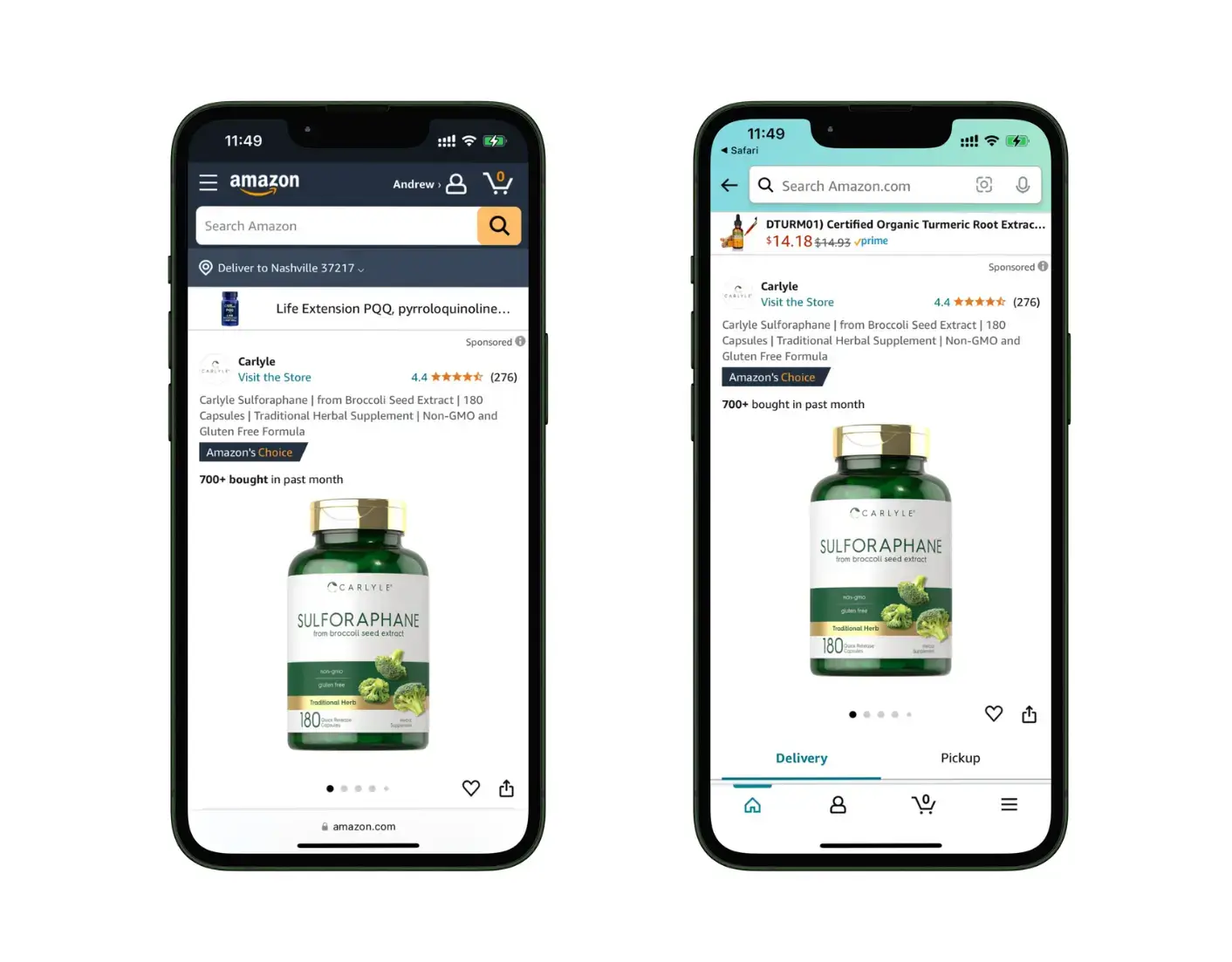
The biggest shopping app in the world, Amazon, uses a mix of web and native elements in their app, and thus can be defined as a hybrid app. It shares content between web and app - which likely saves them a massive amount of operational lift, with the scale of content on their site.
Burger King is another. It uses a custom hybrid build for its ordering app, which lets them share a large part of code across iOS, Android and web. The Uber Eats app, too, was rewritten not too long ago to be a hybrid app, the mobile app powered by their web app.
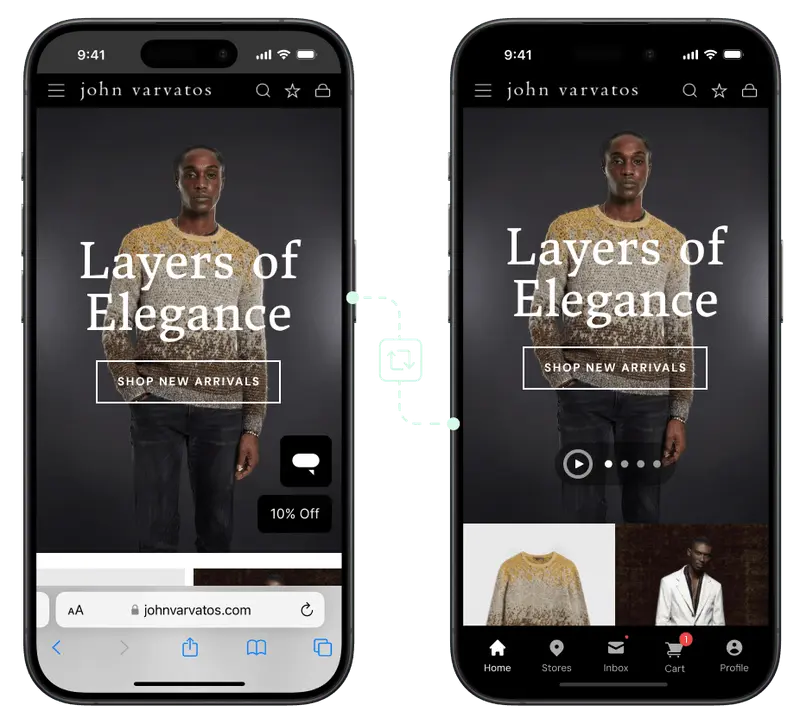
Other examples include Cold Culture, John Varvatos and Jack & Jones - all large brands with global reach, who built fast and full-featured mobile apps with the hybrid approach.
Realistically, there aren’t a huge amount of ecommerce apps being built today that are fully “native” (i.e., separate iOS and Android apps with Swift/Kotlin). Most that people throw into the “native” bucket are cross-platform, built either with React Native or Flutter.
At the end of the day, native apps, cross-platform apps and hybrid apps can be great or they can be poor. The architecture doesn’t make or break the user experience.
The Real Answer to the “Native vs Hybrid” Question for Ecommerce Apps
With web technologies today, you can build fast, mobile-responsive, beautifully designed and highly functional user experiences.
Essentially, you can build all the core design and functionality of your app with a combination of HTML, CSS and JavaScript.
Native/cross-platform gives you some slight improvements in performance, but these performance improvements are unlikely to be that noticeable for an ecommerce app.
For a mobile game, or streaming the NBA finals? Perhaps.
For a customer browsing your catalog and adding a new pair of shoes to their cart? No.
All things being equal, you’d build fully custom, fully native apps for each platform. But they’re not equal.
Custom native apps cost significantly more, and come with a lot more work to manage. That extra overhead is likely going to be much more that any advantages will add to your bottom line.
"If we had unlimited time and money, we would probably go for a custom native app, but that is half a million to a million a year to maintain."
- David Cost, VP of Ecommerce at Rainbow Shops
You can build quality mobile apps with fully native, cross-platform, or hybrid approaches.
If you have extremely high performance demands, or extensive native integrations (heavy use of VR/AR, or functionality outside of what ecommerce apps usually need), you could consider a native build.
But a hybrid approach can do all of what a typical mobile app needs to do. You still have access to native features like push notifications, and to your customer, it’s like any other native app.
The biggest difference is in what it costs your business to build and maintain. And cutting the unnecessary extras of maintaining multiple versions of the same store can completely change the ROI picture for your app.
Final Thoughts
Native and hybrid are ways of building an app, not grades of quality. Both can produce great apps or poor, low-performance apps.
The only consistent difference is in what it costs, and the work it takes to maintain your app. Native builds mean managing multiple versions of your storefront, whereas a hybrid ecommerce app means one codebase powers your store on multiple surfaces.
There are no wrong answers - but for many ecommerce brands, the hybrid web-to-app approach means the same customer-facing end product, for much less work behind the scenes.