The single biggest reason ecommerce brands hesitate to launch a mobile app isn't cost. It isn't technology. It's this question:
“Is anyone actually going to download it?”
It's a fair concern. Margins are tight, and most brands don’t have money or labor to spare on a channel that’s going to sit around and collect dust.
You might also think: “I don’t download apps. I don’t think my customers will either.”
But here’s what you need to know:
- Apps aren’t for everyone; they’re for your top customers, those who want to be closer to your brand.
- You don’t need a huge share of your customers on the app to drive meaningful ROI.
- You also don’t need anything overly complicated to promote the app - it’s primarily just about putting it in front of the right people.
At MobiLoud, we've published 2,000+ apps since 2013. We’ve seen the impact an app can have, with a little bit of promotion.
This guide covers what realistic download numbers look like, the strategies that actually move the needle, and how to turn a modest install base into a meaningful revenue channel.
Setting Expectations
Before we get into tactics, let's calibrate what success looks like. Because if you're coming in expecting 50% of your customer base to download the app, you're going to be disappointed, and you'll probably give up too early.
Your App Is for Your VIPs
The customers who download your app are not a random cross-section of your traffic. They're your most loyal, highest-value customers, the ones who already buy from you repeatedly and want a faster, more convenient way to do it.
For most ecommerce brands, that's somewhere between 5% and 20% of your customer base.
That sounds small. But look at what that segment actually does:
- Junior Couture (luxury childrenswear): Only about 5% of their users are on the app, but that 5% generates around 50% of peak season revenue.
- Pharmazone (retail pharmacy): Their app users account for 63% of total online revenue.
- NumberC (health and beauty): Their app drives 20-30% of total sales.
The pattern is consistent: a small percentage of users generating a disproportionate share of revenue. This is the math that makes mobile apps work for ecommerce brands.
You don't need mass adoption. You need your best customers in the app.
What Adoption Rates Actually Look Like
Based on what we've seen across 2,000+ app launches:
- First 90 days: With active promotion, you could reach 2,000-10,000 installs, depending on existing customer base size and traffic volume.
- Steady state: 5-15% of your customers (not website visitors, customers) can become app users with consistent promotion. This number grows over time.
- The engagement difference: App users typically generate 3-10x more revenue per user than mobile web visitors, with higher conversion rates, longer sessions, and more frequent purchases.
Some brands see faster adoption based on their vertical. Brands with high repeat purchase rates (consumables, beauty, food and beverage, fashion) tend to see faster adoption than brands with longer purchase cycles (furniture, electronics, luxury).
The key insight: you don't need to change anyone's behavior. You don’t need to push people who aren’t really keen on it to download the app.
Your best customers already want to buy from you frequently. The app just gives them a better way to do it.
App Store Optimization: The Basics
Let's start here because it's the lowest-hanging fruit, even though it won't be your primary download driver.
Why ASO Matters (But Not the Way You Think)
People usually don't browse the App Store looking for shopping apps the way they browse for games or productivity tools. Nobody is searching "cool stores to buy clothes from" in the App Store.
What they do search for is your brand name.
A customer sees your email, visits your site on mobile, or hears about you from a friend. They go to the App Store, type in your brand name, and expect to find your app. If they can't find it, or if your listing looks unprofessional, you've lost a download you should have had.
That's the real purpose of ASO for ecommerce: making sure you're findable and credible when someone comes looking for you.
The Basics to Get Right
App title and subtitle: Include your brand name and a clear descriptor. "YourBrand: Shop [Your Category]" works. Don't stuff keywords.
Screenshots: Show your actual app experience. Product pages, collections, the checkout flow, and any standout features (loyalty rewards, push notification examples). On the Apple App Store, about 33.7% of product page views convert to an install. On Google Play, it's about 26.4%. Good screenshots and a clear description improve those numbers.
App description: Lead with what the customer gets, not what the app does. "Shop new arrivals first, get exclusive offers, and check out in seconds" beats "Download our native mobile application for iOS."
Ratings and reviews: Encourage happy customers to leave reviews. A 4.5+ star rating is table stakes. Yon-Ka Paris maintains a 5/5 app store rating; John Varvatos has 4.9/5. These ratings build trust for anyone who lands on your listing.
Category selection: Choose the most relevant primary category (typically Shopping). Add a secondary category if applicable.
ASO is a "set it and update it periodically" task. Spend a few hours getting it right at launch, revisit it quarterly, and move on to the channels that will actually drive volume.
Smart Banners on Your Mobile Website
This is, consistently, the single highest-converting download channel for ecommerce apps.
Why It Works
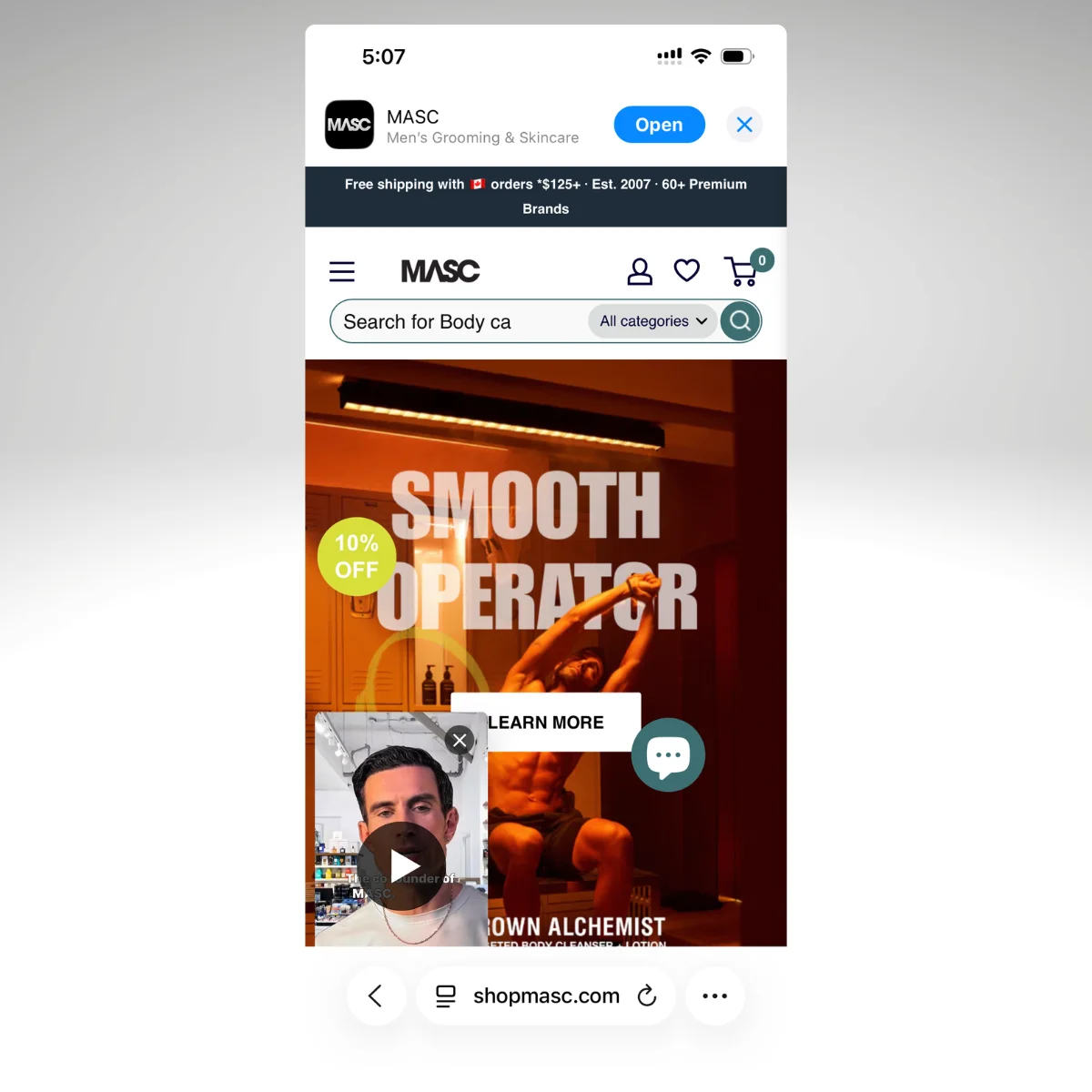
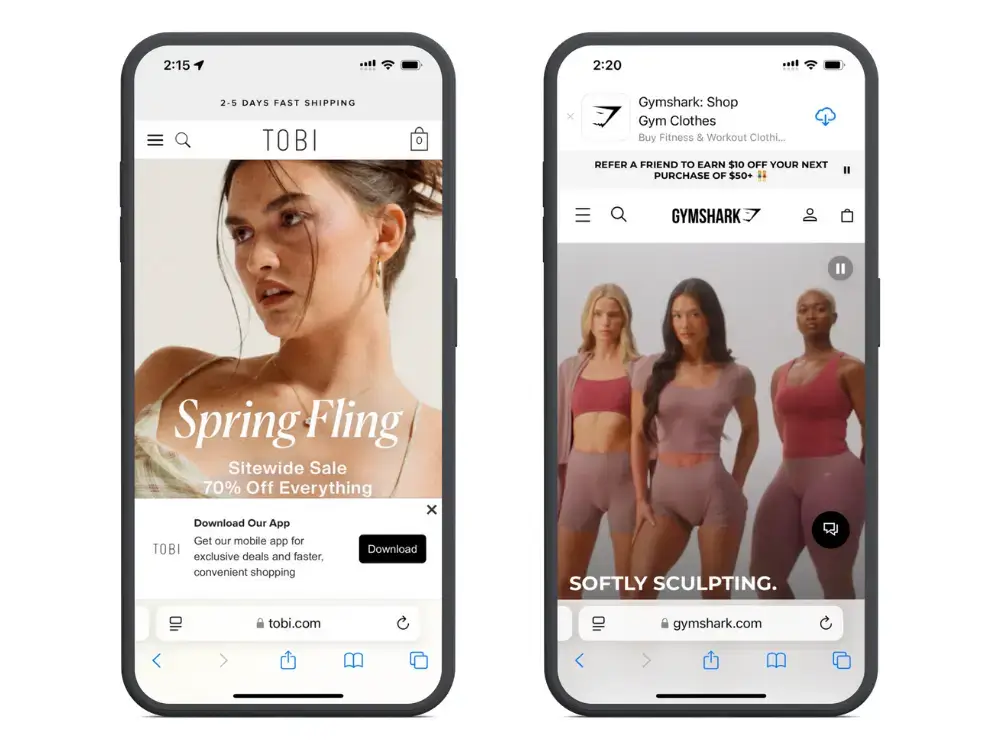
Think about the user flow. Someone visits your website on their phone. They're already interested in your brand, they're already browsing your products, and they're on a mobile device where they can install the app immediately.
A smart banner at the top or bottom of the screen says: "Shop faster in our app. Download free." One tap takes them to the App Store.
You're catching people at the exact moment they're most receptive: already engaged with your brand, already on mobile, and already browsing.
The John Varvatos Example
When John Varvatos initially launched their app, they saw slow adoption. Why? Because their customers didn't know about it.
"If you went on johnvarvatos.com prior, you didn't know that we had an app."
- Nick Barbarise, Director of IT at John Varvatos
The inflection point was adding smart banners and QR codes. It was that simple - no complicated paid ad funnels or huge incentives. These two tactics alone drove measurable increases in downloads, usage, session time, and spend.
The app went from "we have it but nobody knows" to an active revenue channel with 10x revenue per app user compared to mobile web.
Implementation Tips
- Don't be aggressive. A persistent but dismissable banner is better than a fullscreen interstitial that frustrates visitors. You want to invite, not interrupt.
- Customize the message by page. A banner on a product page can say "Get back-in-stock alerts in our app." A banner on the homepage can highlight the app generally. Context-specific messaging converts better.
- Show it on every mobile visit. Some brands only show the banner to first-time visitors. This is a mistake. Repeat visitors are actually more likely to install, because they already know and trust you.
- Test placement. Top-of-page banners are standard, but bottom-of-screen sticky banners can perform well too. Test both.
QR Codes: The Smart Banner for Desktop (and Beyond)
Smart banners work on mobile because your visitor is already on the device where they'll install the app. But what about desktop visitors? They can't tap through to the App Store from their laptop.
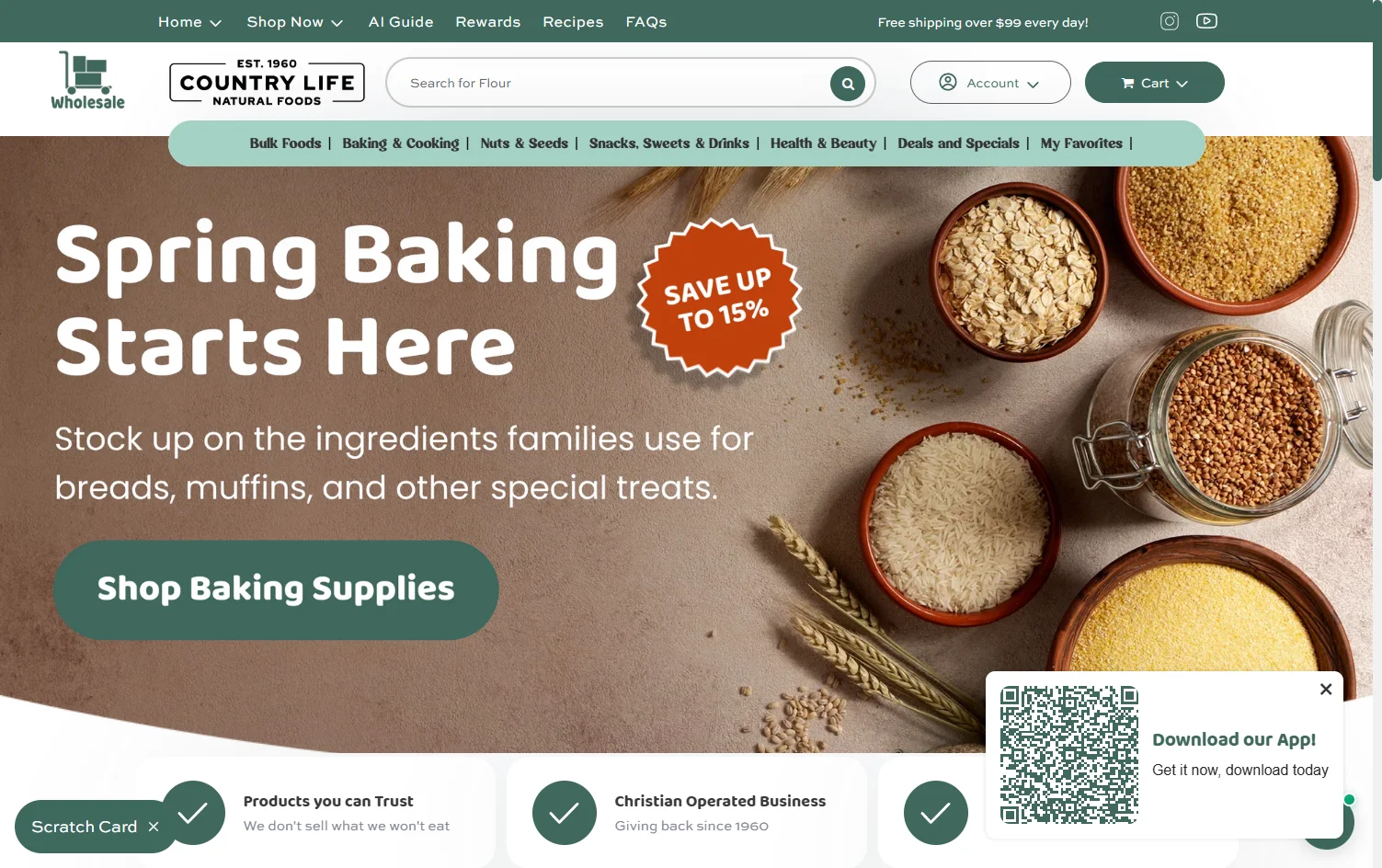
That's where QR codes come in. A popup or slide-in on your desktop site with a QR code and a clear reason to scan ("Get 15% off your first app order") is the desktop equivalent of a smart banner. Your visitor grabs their phone, scans, and they're in the App Store. It's the lowest-hanging fruit for converting desktop traffic into app installs, and most brands overlook it entirely.
On Your Desktop Website
- Popup or slide-in with a QR code. Trigger it after a few seconds on site, on exit intent, or on specific high-value pages (product pages, post-checkout confirmation). Keep the design clean: QR code, one line of copy, and a dismiss button.
- Dedicated banner or footer section. A persistent QR code in your site footer or a banner on your homepage gives desktop visitors an always-available path to the app without being intrusive.
- Post-purchase confirmation page. The customer just bought something on desktop. They're engaged, they trust you, and they're about to wait for shipping. "Track your order and get exclusive deals in our app" with a QR code is a natural next step.
Beyond the Screen
QR codes also bridge the gap between physical touchpoints and your app.
- Packaging inserts. A card inside the shipping box that says "Get 10% off your next order. Download our app." This catches customers at a high-satisfaction moment: they just received something they bought and are excited about it.
- In-store signage. Near the register, on table displays, on fitting room mirrors. John Varvatos uses QR codes on business cards and at the register in their retail locations.
- Receipts. Both digital and paper receipts. Your customer just completed a purchase, so they already trust you. Low friction.
- Event materials. If you sponsor an event, run a popup, or get out in the world for any other reason, use this as an opportunity to promote your app.
Tips
- Make sure the QR code goes to the right store. Ideally, detect the device and route to the Apple App Store or Google Play automatically.
- Track it. Use UTM parameters or unique landing pages so you can measure which placements drive the most installs.
MobiLoud helps you set up all the promo material you need to drive app downloads: smart banners, QR codes and more. When you launch with us, you don’t just get an app - you get a partner, invested in your success.
Want to discuss your launch, and see if MobiLoud’s the right way to do it? Get a free consultation now.
Email Campaigns: Your Highest-Intent Audience
Your email list is full of people who've already bought from you or expressed interest. They're the exact audience most likely to download your app.
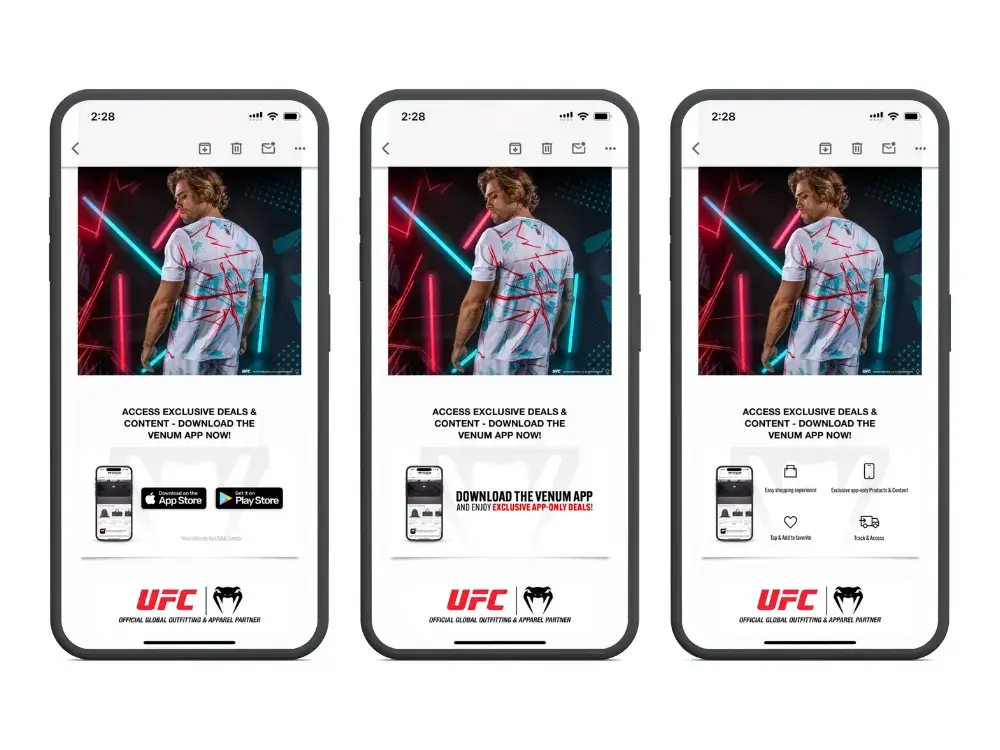
Yet still we see many brands with a great app, who are sending daily emails, but not promoting the app to their email list.
This is a huge miss. Here’s how to use your email list to drive app downloads:
Launch Campaign
When your app goes live, send a dedicated launch email to your full list. This single email will likely drive more installs than any other tactic in the first week.
Keep it simple:
- Announce the app
- Show 2-3 screenshots
- Highlight the top benefit (usually push notifications for early access / exclusive deals)
- Link directly to the App Store and Google Play
Ongoing Promotion
After the launch blast, weave app promotion into your existing email flows:
- Welcome series. Add a "Download our app" step. New subscribers are at peak engagement; some percentage will install.
- Post-purchase emails. "Love your order? Shop faster next time in our app." This catches customers in a positive moment.
- Email footers. Add App Store and Google Play badges to your email template footer. It's passive but consistent; over thousands of sends, it adds up.
- Win-back flows. For lapsed customers, "We've launched a new app with exclusive offers" gives you a fresh reason to re-engage.
What Not to Do
Don't send weekly "download our app" emails. One strong launch email, integration into your flows, and a footer badge is enough. Repeated standalone app promotion emails will fatigue your list fast.
First-Purchase App Discounts
Offering a discount on the first purchase through the app (typically 10-15% off) is one of the most effective install drivers, and the economics behind it make more sense than most merchants realize.
Why It's Worth the Discount
The instinct is to resist discounting. You're already acquiring these customers through other channels; why give them a discount just to change where they shop?
Here's why: the lifetime value math changes once someone is in the app.
App users generate 3-10x more revenue per user than mobile web visitors. They visit more often, convert at higher rates, and spend more per order. A 10% discount on one order to move a customer into a channel where they'll spend 3-10x more over time is a strong trade.
Think of it the same way you'd think about a first-time email subscriber discount. You're not discounting for charity. You're investing in a higher-value relationship.
"Those app-specific promotions are very popular and they've been driving a solid amount of downloads...these customers are staying active on the app."
- Myracle McCoy, Lifecycle Marketing Manager at Canna River
How to Structure It
- 10-15% off the first app purchase is the sweet spot. High enough to motivate, low enough that it doesn't condition customers to expect constant discounts.
- Make it a one-time use code. You're incentivizing the install, not creating a permanent discount expectation.
- Promote it everywhere. The discount becomes the hook for your smart banners, QR codes, email campaigns, and social media posts. "Download our app, get 15% off your first order" is a more compelling CTA than "Download our app."
- Set an expiration. A 7-14 day window creates urgency without being too pushy.
Social Media and Paid Promotion
Most people think of running ads or social media campaigns first when they think of app marketing strategies.
But these are supplementary channels. They work, but they're rarely the primary download driver for ecommerce apps.
Here’s how you could use them in your download strategy:
Organic Social
Announce the app launch across your channels. Pin the post for a week. After that, mention the app occasionally in relevant contexts (new product drops, flash sales, loyalty rewards) rather than posting standalone "download our app" content.
The brands that do this well tie app promotion to something the customer cares about. "New collection dropping Friday at noon. App users get early access" is infinitely more effective than "Download our app today!"
Paid App Install Campaigns
Running paid campaigns specifically for app installs (through Apple Search Ads, Google App Campaigns, or Meta) can work but isn't necessary for most ecommerce brands.
The average cost per install in Western markets is about $4.50 on iOS and $3.20 on Android. If your average app user generates significantly more revenue than a mobile web visitor (which the data consistently shows), the math can work.
But start with the free/owned channels first. Most brands don't need paid installs to build a profitable app user base.
If you do run paid campaigns, start with retargeting: show app install ads to people who've already visited your website or purchased from you. They're far more likely to install than cold audiences.
The 90-Day App Download Playbook
If you're launching an app (or relaunching promotion for one that's been underperforming), here's a practical timeline.
Week 1: Foundation
- Finalize your app store listing (screenshots, description, keywords)
- Set up smart banners on your mobile website
- Prepare your launch email
- Create a first-purchase discount code for app users
Weeks 2-3: Launch Push
- Send your launch email to your full list
- Post on social media (pin the announcement)
- Add QR codes to packaging inserts and any physical locations
- Add App Store/Google Play badges to your email footer template
- Start your welcome push notification flow
Weeks 4-8: Sustained Promotion
- Integrate app mentions into your email flows (welcome series, post-purchase, win-back)
- Begin regular push notification campaigns (2-3 per week, mixing promotional and contextual)
- Monitor install rates by channel and double down on what's working
- Adjust smart banner messaging based on performance
Weeks 9-12: Optimize and Measure
- Review per-user revenue: app vs mobile web
- Calculate push notification ROI
- Assess which install channels drive the highest-value users (not just the most installs)
- Decide whether paid install campaigns are worth testing
- Share results with your team to build internal buy-in for continued app investment
You Don't Need Everyone. You Need the Right People.
The brands that succeed with mobile apps don't chase download counts. They focus on getting their best customers, the ones who already love their brand and buy repeatedly, into a channel where the experience is faster, the engagement is higher, and the communication is direct.
A few thousand highly engaged app users will outperform hundreds of thousands of casual mobile web visitors. That's not a theory. It's what we see every day across the 2,000+ apps we've helped launch.
We’ll help you launch your app for a minimal investment in time, effort and money - and we’ll also support you with everything you need to actually get downloads.
If you want to discuss how MobiLoud can help you launch, get in touch and book a free consultation now.
If you're holding back on an app because you're worried nobody will download it, the data says otherwise. Your best customers are waiting for a reason to get closer to your brand. Give them one.