Someone has your app installed. You send them an email about a product they might like. They tap the product link and, instead of seeing it in the app, they land back on your mobile website.
This is one of the biggest mistakes for brands with their own apps (and one of the easiest to fix). You’ve done the hard part - built your app, got the download - and now it’s just about conditioning your customers to make the app a part of their daily lives.
The technology that controls where your links send someone to is called deep linking. It lets a link open your app and take the customer directly to the relevant product, collection, cart or account screen.
On iOS, the standard implementation is called Universal Links. Android calls its version App Links.
Here’s how these links work, what you need to set up and why they matter for far more than navigation.
Key Takeaways
- A deep link opens a specific location inside an app, rather than simply launching the app homepage.
- Apple Universal Links and Android App Links let normal website URLs open corresponding content in an installed app.
- When the app isn’t installed, the same URL normally opens the equivalent page on the website.
- Sending someone through an app install and preserving their original destination requires deferred deep linking or another purpose-built flow.
- Deep linking connects email, SMS, social, QR codes and other channels to your app, giving customers more reasons to return after installing it.
How Do You Make a Link Open an App?
You can make a normal HTTPS link open your app by creating a verified association between your website and the app.
Four things need to be in place:
- Your app declares which website domains and URL patterns it can handle.
- Your website publishes a file confirming that the app is authorized to handle those links.
- Your app knows what to display when it receives each URL.
- The URL has a useful fallback for people who don’t have the app.
Imagine you have this product URL:
https://example.com/products/red-running-shoe
When everything is configured correctly, a customer who has your app can tap that link and see the red running shoe inside the app.
Someone without the app sees the product on your website instead.
This is the cleanest setup because you don’t need to create one link for the web and another for the app. The same URL can take each customer to the best available destination.
There are limits. You can’t write a link that overrides every choice made by the operating system, browser, originating app or user. The job is to configure the preferred behavior, provide a good fallback and test the routes customers will use in practice.
What Is a Deep Link?
A deep link sends someone to a particular location inside an app.
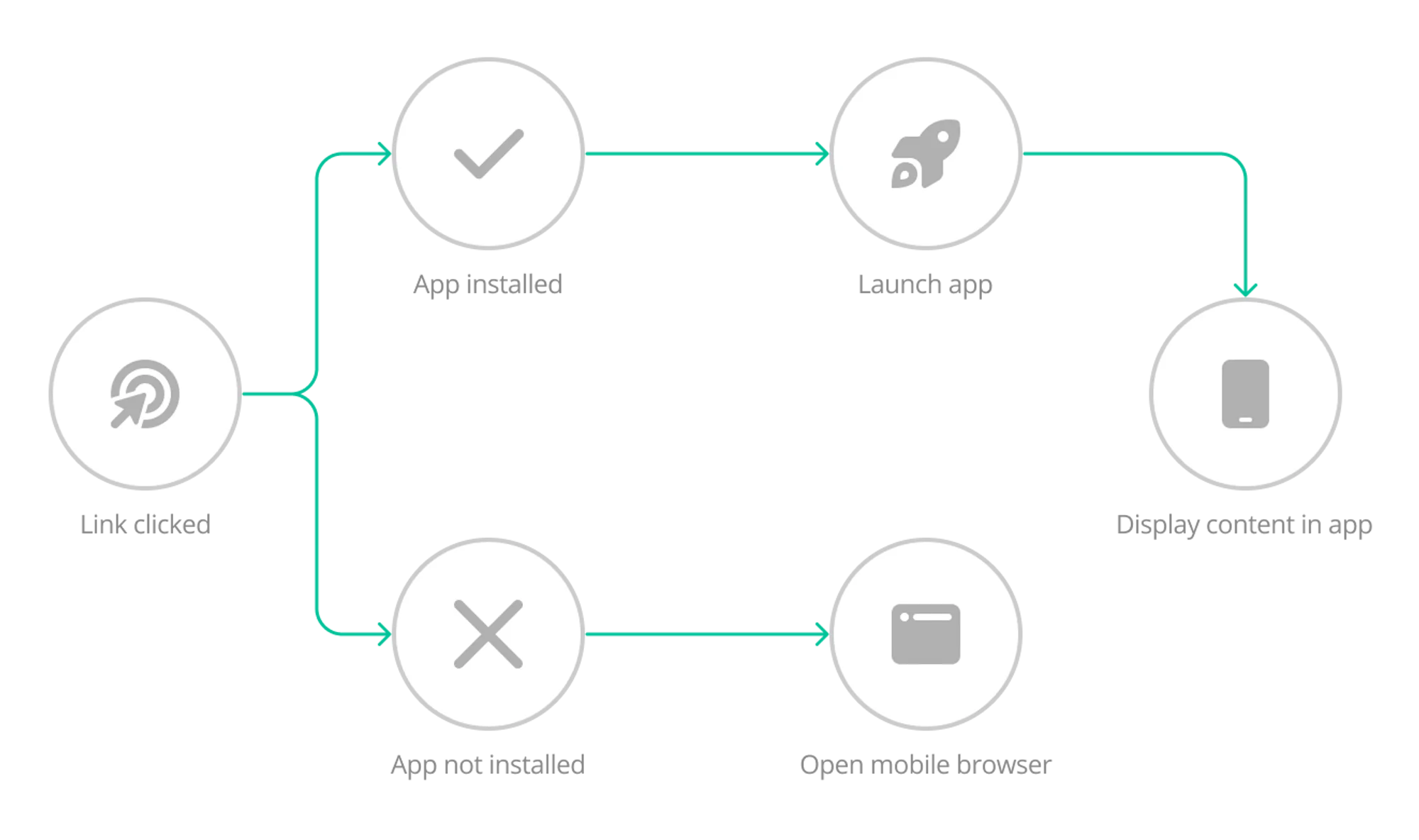
A basic app link might only launch the app and leave the customer on its homepage. A deep link keeps the context that made them tap in the first place.
A link to a running shoe opens that shoe. A cart reminder opens the cart. A loyalty message opens the rewards screen.
For an ecommerce app, useful deep link destinations might include:
- A product or collection
- The customer’s cart
- A sale or campaign page
- A loyalty account
- Order tracking
- A back-in-stock product
- A replenishment or reorder page
“Deep link” is the general term for this behavior. Universal Links and App Links are the verified systems Apple and Google provide for opening web URLs in iOS and Android apps.
Deep Links, Universal Links and App Links
The terminology gets confusing because people often use these names interchangeably.
Here’s how the main link types differ:
| Term | What It Means |
|---|---|
| Deep link | A general term for a link that opens a specific location inside an app |
| Universal Link | Apple's verified web-link system for opening corresponding content in an iOS app |
| App Link | Android's verified web-link system for opening corresponding content in an Android app |
| Custom URL scheme | An app-specific address such as yourapp://product/123 |
| Deferred deep link | A flow that attempts to preserve the intended destination when the person has to install the app first |
Custom URL schemes are still used in some situations, but they don’t have the same domain verification or natural web fallback. For content that also exists on your site, verified web links are usually the better foundation.
What Happens When Someone Taps a Deep Link?
The result depends on whether the app is installed and how the link has been configured.
The App Is Installed
The operating system recognizes the website-app association and passes the URL to your app. The app then interprets the path and opens the relevant content.
For example:
/collections/summer-sale → Summer Sale collection in the app
The app may load the URL directly or translate it into a native screen. Either way, the customer should land in the context they expected.
The App Isn’t Installed
A standard Universal Link or App Link opens the corresponding web page. That’s why it helps to use real website URLs: the fallback remains useful even when there’s no app to receive the link.
These systems don’t automatically send the customer to the App Store or Google Play. If app acquisition is the goal, you’ll need a separate store-redirection flow or a deep linking platform that supports it.
The Customer Installs the App After Tapping
Preserving a destination across installation is called deferred deep linking.
In the intended flow, the customer taps a product link, goes through the app store, installs the app and still lands on the original product after first open.
This requires more than basic Universal Links or App Links. It normally involves a linking or attribution provider and needs careful testing, particularly on iOS.
One service you shouldn’t build a new setup around is Firebase Dynamic Links. Google shut it down on August 25, 2025, and links served through the old service now return errors. Google’s migration guidance points teams that need comparable features toward other deep-linking and attribution providers.
How to Set Up Deep Linking on iOS and Android
The exact code depends on your app architecture, but the implementation follows the same broad process on both platforms.
1. Decide Which URLs the App Should Handle
Start with the links that play a real role in your customer journey. For an ecommerce app, products and collections are the obvious starting point. Cart, account, loyalty, order tracking and campaign pages may need additional logic.
Create a simple routing plan:
| Website Path | App Destination | Logged-Out Behavior |
|---|---|---|
/products/{handle} |
Matching product | Open product |
/collections/{handle} |
Matching collection | Open collection |
/cart |
Current cart | Open cart or empty cart |
/account/orders/{id} |
Matching order | Ask customer to sign in, then continue |
/pages/rewards |
Loyalty screen | Ask customer to sign in, then continue |
Plan the logged-out and error states too. If a customer follows an order link and has to sign in, the app should continue to that order afterward. Legal pages, unsupported content or some checkout flows may need to stay on the web.
2. Configure Universal Links on iOS
For iOS, your developer will need to:
- Add the Associated Domains entitlement to the app.
- List each supported domain using an entry such as applinks:example.com.
- Publish an apple-app-site-association file on your web domain.
- Define the paths or components the app can handle.
- Add app-side logic that receives the URL and opens the right content.
The association file is served over HTTPS from:
https://example.com/.well-known/apple-app-site-association
It has no .json extension. One useful edge case to know: when someone is already browsing your site in Safari and taps a link to the same domain, iOS may keep them in Safari because that appears to match their intent.
3. Configure App Links on Android
For Android, your developer will need to:
- Add intent filters for the supported website URLs to the app manifest.
- Set android:autoVerify="true" for the relevant filters.
- Publish an assetlinks.json file on the website.
- Include the app package and matching signing certificate fingerprint in that file.
- Add app-side routing for the incoming URL.
The website file lives at:
https://example.com/.well-known/assetlinks.json
Android checks this file to confirm that the website authorizes the app to handle its links. Android 15 and later also let teams refine some link rules through assetlinks.json without releasing a new app version.
4. Choose the Fallback
For most links, the equivalent mobile web page is the safest fallback. For an app-install campaign, you might use a smart link that points to the appropriate store, adding deferred deep linking if you need to preserve the destination afterward.
Sending every non-app user to a generic store listing can throw away the product or offer that earned the click.
5. Add Campaign and Conversion Tracking
Deep link reporting should tell you more than whether the app opened. Where your tooling allows it, track:
- Campaign and source
- App open or web fallback
- Destination reached or routing failure
- Add to cart, purchase or another intended action
- New install and first open, where reliable attribution is available
Preserve useful campaign parameters when the app receives the URL, and make sure your router can safely handle query strings.
Avoid putting personal data, reusable credentials or other sensitive information directly in a deep-link URL. Treat incoming parameters as untrusted input and validate them before the app acts on them.
6. Test the Routes Customers Will Use
A link that works when pasted into one browser can still fail inside an email or social campaign. Test at least the following:
- iOS and Android
- App installed and not installed
- Current and older supported app versions
- Safari, Chrome and social in-app browsers
- Email, SMS and QR codes
- Logged-in and logged-out states
- Valid, missing and expired destinations
- Campaign links with tracking parameters
Pay particular attention to click-tracking redirects. An email or SMS platform may replace your URL with its own tracking domain before redirecting to your site. The phone sees the tracking hostname first, which can stop the verified app link from opening as expected. Some in-app browsers also intercept links or keep them inside the originating app.
Where possible, test the exact links generated by your marketing tools, not clean versions copied directly from the website.
How Deep Links Help Turn an App Install Into a Habit
Getting someone to install your app is only the beginning. Customers can download an app, use it once and then go straight back to following links in email, SMS, search and social media.
If all those links lead to your mobile website, there’s a chance that your customers could download your app, forget they have it downloaded, and continue to only shop on your site.
That defeats the purpose of launching the app. It’s supposed to encourage more habitual shopping activity, and more repeat visits from your app users.
Here are a few reasons why deep linking is a crucial part of the app journey.
Your Existing Channels Become Routes Into the App
Your customers already respond to product launches, back-in-stock messages, sale announcements, loyalty updates and cart reminders.
Deep linking lets those same campaigns reopen the app at the moment the customer is interested.
The customer doesn’t have to develop a new behavior before your app becomes useful. They can keep tapping the emails and messages they already receive. The destination changes when the app is installed.
Each campaign becomes another chance to reinforce the app as a useful place to interact with your brand.
The Customer Keeps the Context Behind the Click
Opening the app homepage creates another job for the customer. They now have to search for the product, collection or offer they were promised.
A deep link removes that extra step:
Product message → tap → matching product
The difference sounds small, but it removes a point of friction between interest and action.
Depending on how your app is built, the customer may also keep an active login, saved preferences or an existing cart. These aren’t automatic benefits of deep linking, but they can make the in-app destination even more useful when the app and account experience support them.
Repeated Re-entry Makes the App More Familiar
Habits usually form through repetition in a stable context. A customer sees something relevant, taps it and completes the next step in your app. Then it happens again through another campaign.
Over time, the app feels less like something they downloaded during a promotion and more like the normal place they shop with you.
Deep linking won’t create that habit by itself. The app still needs a strong experience, relevant campaigns and a reason for the customer to come back.
What deep linking does is remove a common break in the loop. It stops your other channels from repeatedly training installed users to shop on the website instead.
Practical Deep Linking Campaigns for Ecommerce Apps
Once products, collections and account routes work reliably, you can use them across the customer lifecycle.
| Campaign | Deep-Linked Experience |
|---|---|
| New product email | Opens the product featured in the email |
| Back-in-stock SMS | Opens the item that's available again |
| Sale announcement | Opens the relevant sale collection or landing page |
| Cart reminder | Opens the customer's current cart where supported |
| Loyalty update | Opens the rewards balance or redemption screen |
| Reorder QR code | Opens the product previously purchased |
| Order support message | Opens order tracking after authentication |
| Push notification | Opens the content or offer described in the message |
Why Does a Link Open the Browser Instead of the App?
Things don’t always work out as intended - especially in tech.
If a link keeps opening the website, work through these likely causes:
- The website-app association failed. The association file may be missing, malformed, inaccessible over HTTPS or inconsistent with the app’s identity.
- The hostname doesn’t match. example.com, www.example.com and a campaign tracking domain need to be handled deliberately.
- The URL path isn’t included. The domain may be verified while the particular product or campaign path sits outside the configured rules.
- The installed app is too old. A version released before the route was added may not know how to handle it.
- A tracking service changed the link. Email, SMS and ad platforms can wrap the destination in a redirect URL that isn’t associated with your app.
- The originating app intercepts links. Some social and email apps use their own browsers or link-handling rules.
- The user previously chose the website. Operating systems can remember a preference and keep opening that domain in the browser.
- The customer is already browsing the same domain in Safari. iOS may keep a same-domain link in Safari to respect the apparent browsing intent.
- The app receives the link but can’t route it. In this case, the app may open to its homepage, show an error or fail after a login prompt.
If you’re having issues, check the association first, then test the exact hostname, path, app version and originating channel.
That sequence usually narrows the problem faster than changing several parts of the setup at once.
MobiLoud Apps + Deep Linking
Deep linking is just one of many technical aspects that come with building an app for your store.
And it’s one of the things we take off your plate, when you work with MobiLoud.
MobiLoud turns your existing site into iOS and Android apps, with deep linking enabled, so a product, collection or campaign URL can open the corresponding experience inside the installed app.
We handle the app configuration and development required for Universal Links and App Links. Our team then provides the apple-app-site-association and assetlinks.json files, which you’ll put into a specific folder in your site’s directory.
We’ll walk you through everything, to make it easy. Read our help docs for more on how this works.
With deep linking set up, along with every other technical aspect of your app handled for you, you’ll be in the best position to build your app into a powerful brand asset and retention channel.
If you’re considering an ecommerce app and want deep links to work across the marketing setup you already have, book a consultation with us to see how the implementation would work, and whether this is the right way to launch your app.
Make the App Part of the Journey
Deep linking solves a straightforward navigation problem: someone taps a link and lands in the right place inside your app.
Its bigger value builds over time. Email, SMS, social campaigns, QR codes and support messages all become natural routes back into the app.
Customers don’t have to remember to open it separately, and they don’t lose the context that made them tap.
An app becomes familiar through repeated use. Deep links create more of those opportunities, while making each return visit easier.
Frequently Asked Questions
How Do I Make a URL Open an App Instead of a Browser?
Configure Universal Links on iOS or App Links on Android, publish the appropriate website association file and add app-side routing for the URL.
What Happens If Someone Clicks a Deep Link Without the App Installed?
A standard Universal Link or App Link normally opens the corresponding web page. Store redirection and post-install routing require an additional flow.
What’s the Difference Between a Deep Link and a Universal Link?
A deep link opens specific app content. A Universal Link is Apple’s verified implementation for website URLs; Android’s equivalent is App Links.
Can You Force a Link to Open an App?
You can configure verified links to prefer your installed app, but the operating system, browser, originating app, redirects and user preferences can affect the result.
Do Deep Links Work in Email and SMS?
Yes, but test the links created by your marketing platform. Tracking domains and redirects can change how the phone handles them.
Do I Need a Third-Party Deep-Linking Service?
Not for basic Universal Links and App Links. You may want one for deferred deep linking, attribution, app-store routing or advanced link management.
Sources
- Apple: Supporting Universal Links in Your App
- Apple: Allowing Apps and Websites to Link to Your Content
- Apple: Defining a Custom URL Scheme for Your App
- Android Developers: About App Links
- Android Developers: Verify App Links
- Android Developers: Troubleshoot App Links
- Firebase: Dynamic Links Deprecation FAQ
- MobiLoud: Use App Links and Universal Links