Push Notifications on iOS vs Android: How They Work in 2026

iOS requires permission before you can send a single notification - and you only get one chance to ask. Android used to opt everyone in automatically, but now asks too (since Android 13). Both platforms give users increasing control over which notifications they see and when. Understanding these differences is the foundation of any effective push strategy.
iOS requires permission before you can send a single notification - and you only get one chance to ask. Android used to opt everyone in automatically, but now asks too (since Android 13). Both platforms give users increasing control over which notifications they see and when. Understanding these differences is the foundation of any effective push strategy.
Push notifications are the main reason most ecommerce brands want a mobile app.
They're the most direct line to your customers - more immediate than email, cheaper than SMS, and harder to ignore than either.
But iOS and Android don't handle push notifications the same way. The differences aren't just cosmetic. They affect how many of your users you can actually reach, how your notifications appear, and how much control the operating system gives users to filter, silence, or ignore them entirely.
This guide explains how push works on each platform in plain terms; what happens behind the scenes, what your users experience, and what it all means if you're running an app.
How Push Notifications Work (The Simple Version)
Before getting into platform differences, here's the basic pipeline. It works roughly the same way on both iOS and Android:
- Your user installs your app and (on iOS) grants notification permission. The app registers with the platform's push service and receives a unique token - think of it like a mailing address for that specific device.
- Your server stores that token. When you want to send a notification, you send the message and the token to the platform's push service.
- The push service delivers it. On iOS, that's Apple Push Notification service (APNs). On Android, it's Firebase Cloud Messaging (FCM). These services handle the actual delivery to the device.
- The device displays it according to the user's settings - as a banner, a sound, a badge on the app icon, or some combination.
That's it. Your server talks to Apple or Google, and they talk to the device. You never send a notification directly to someone's phone.
Where things diverge, and where it matters for your business, is in what happens at each step.
The Permission Model
This is the biggest difference. And it's one of the most important parts of getting the most out of push notifications.
iOS: You Get One Shot
On iOS, your app cannot send a single push notification until the user explicitly says yes.
The first time your app requests permission, iOS shows a system dialog: "[App Name] Would Like to Send You Notifications" with two buttons: Allow and Don't Allow.
If the user taps Don't Allow, that dialog never appears again. Your app can't re-trigger it.
The only way the user can change their mind is by going into Settings > Notifications > Your App and manually turning notifications on.

Most won't.
This is why timing the permission request matters so much. If you ask the moment someone opens your app for the first time (before they've seen any value) a lot of people will tap Don't Allow out of reflex.
The smarter approach is what's called a "soft ask": show your own in-app screen first that explains what kind of notifications you'll send and why they're useful, and only trigger the real system dialog after the user taps something like "Yes, notify me."
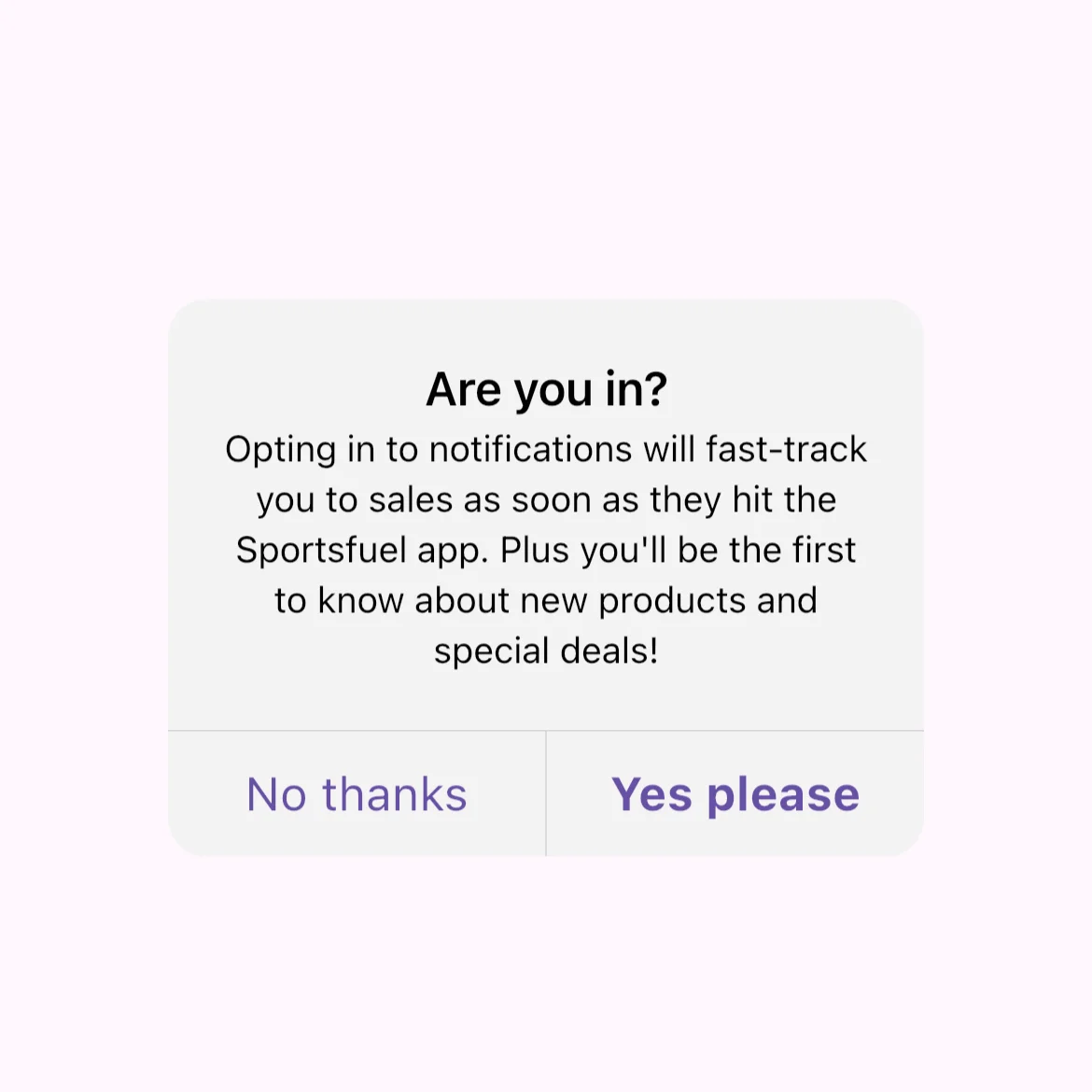
That way, the people who reach the system dialog are already primed to say yes.
Current iOS opt-in rates for ecommerce apps average around 50%. That means roughly half your iOS users will never see a single push notification from you - if your opt-in strategy is no better than average.
This makes the ask strategy one of the highest-leverage things you can optimize.
Android: It Used to Be Automatic, Now It Asks Too
Before Android 13 (released in 2022), push notifications were on by default for every installed app.
You didn't need permission. The moment someone installed your app, you could send them notifications. Opt-in rates were effectively near 100%.
Android 13 changed this. Apps now have to request the POST_NOTIFICATIONS permission, and users see an Allow/Don't Allow dialog similar to iOS.
If they deny it, you can ask one more time. But after two denials, the system blocks further prompts, just like iOS.
There's a transitional wrinkle: apps that were already installed when a device upgraded to Android 13 were auto-granted permission. So the full impact of the change is still rolling out as people buy new phones.
Current Android opt-in rates for ecommerce apps average around 68%, which is still significantly higher than iOS. But the gap is narrowing year over year as more Android users land on the opt-in model.
What This Means for You
The permission model is the single biggest factor in how many users you can reach. On a combined iOS/Android user base, you might be looking at roughly 50-70% of your users actually receiving your notifications - and that's before accounting for users who later turn them off.
Every percentage point of opt-in rate translates directly to revenue. The data on this is clear: users who receive at least one push notification in the first 90 days show roughly 3x higher retention rates than those who don't.
Getting the permission prompt right is crucial if you want your app to succeed.
How Notifications Appear on Each Platform
Once a user has opted in, the two platforms display notifications differently.
iOS: Clean and Controlled
iOS notifications show up in three places:
- Lock Screen — notifications stack up while the phone is locked
- Notification Center — swipe down from the top to see recent notifications
- Banners — a brief pop-up at the top of the screen when the phone is unlocked and in use
.webp)
Every notification looks more or less the same: your app icon, a title, a body, and optionally an image or media attachment. iOS enforces a consistent visual format across all apps.
You can include rich media (images up to 2MB, GIFs, even short video), and rich notifications see about 56% higher open rates than plain text - but you don't have the freedom to completely redesign how the notification looks.
iOS also groups notifications by app by default. If you send five notifications, they stack into one expandable group rather than flooding the lock screen with five separate items.
Android: More Flexible, More Visible
Android notifications appear in:
- Status bar — a small icon at the top of the screen signals there's something new
- Notification shade — pull down from the top to see all notifications, with more detail than iOS shows
- Notification dots — a colored dot (or number badge on Samsung/Xiaomi) appears on your app icon
.webp)
Android gives you significantly more control over how notifications look. You can include large images, custom layouts, progress bars, action buttons that work without opening the app, and expandable content.
Users can long-press a notification to see more detail, reply inline, or take actions directly from the shade.
Android also supports notification channels (since Android 8.0), which are one of the platform's most useful features.
You define categories for your notifications ("Order Updates," "Promotions," "Back in Stock") and users can independently control each one.
Someone can silence your promotional notifications while keeping order updates at full volume.
This is a win for everyone: users get control, and you avoid the all-or-nothing situation where someone turns off all your notifications because they're tired of promos.
What the Operating System Does With Your Notifications
This is where things have gotten more complicated in recent years. Both platforms are increasingly inserting themselves between your notification and the user's eyeballs.
iOS: Focus Mode, Notification Summary, and AI Filtering
Focus Mode (iOS 15+) lets users create profiles (Work, Sleep, Personal, etc.) that silence most notifications.
When a Focus is active, your notification is delivered but hidden until the Focus ends. Only apps the user has specifically whitelisted will break through.
Time-Sensitive notifications (delivery updates, payment confirmations) can also break through if the user has allowed that option. But Apple restricts this category and expects you to use it honestly.
Notification Summary (iOS 15+) lets users batch notifications into a scheduled digest. For example, delivered at 8 AM and 6 PM. If your user has this on, your flash sale notification sent at 10 AM might not be seen until 6 PM.
Time-Sensitive notifications bypass the summary.
Apple Intelligence (iOS 18.1+) introduced AI-powered notification summaries that condense your notification text into shorter versions.
Starting with iOS 18.4, the system also applies "Priority Notifications" - the AI decides which notifications are important and surfaces those at the top.
You have no API to influence this. The AI reads the content and makes its own judgment.
Android: Notification Cooldown, AI Summaries, and Auto-Categorization
Do Not Disturb on Android silences sound and vibration, but notifications still arrive in the shade - they're visible but don't interrupt.
Users can whitelist specific apps or even specific notification channels to override DND.
Notification Cooldown (Android 15) progressively reduces the volume and vibration for rapid successive notifications from the same app.
If you send multiple notifications in quick succession, the later ones will be quieter. This doesn't affect how they display, just how aggressively they alert.
AI-powered summaries and auto-categorization (Android 16, mid-2025) are the newest development.
Google's Notification Organizer automatically categorizes notifications and can silence lower-priority ones like promotions. This is currently limited to Pixel devices but is expected to expand.
For ecommerce apps, this means your promotional pushes may be auto-suppressed by the OS without the user doing anything.
What This Means for You
The trend on both platforms is the same: the operating system is becoming a gatekeeper between your notification and the user.
Both Apple and Google are using AI to decide what's "important" and what isn't, and promotional notifications are the most likely to be filtered.
This makes two things more important than ever.
First, the quality and relevance of each notification matters more than volume. A well-timed, personalized notification about a product someone actually browsed will be treated differently (by both the AI and the user) than a generic "20% off everything!" blast.
Second, transactional and triggered notifications - order updates, back-in-stock alerts, cart reminders - are more resilient to filtering because both platforms recognize them as higher-priority content.
The Numbers: iOS vs Android Push Performance
Here's how the two platforms compare on the metrics that actually matter:
A few things stand out. Android has higher opt-in rates, higher click-through rates, and significantly higher reaction rates overall.
The reaction rate gap (10.7% vs 4.9%) is driven by Android's notification shade being more persistent and interactive - users can act on notifications without fully opening the app.
But iOS users who do opt in tend to be more intentional. They chose to receive your notifications, which can mean higher engagement quality per user even if the raw numbers are lower.
The practical takeaway: you need a push strategy for both platforms, but the tactics should differ.
On iOS, optimize for getting the opt-in and making every notification count. On Android, take advantage of notification channels and richer formatting to give users a better experience.
What This All Means If You're Running an Ecommerce App
Push notifications account for roughly 15% of ecommerce revenue from just 3% of total marketing messages - the best efficiency ratio of any channel.
Cart abandonment pushes can recover up to 20% of lost sales. Users with push enabled show 3x higher retention.
But none of those numbers apply to you unless your app can actually use push properly on both platforms. Here's the practical reality:
First, you need a native app.
Web push and PWA push exist, but they don't have access to the full push toolkit - no notification channels on Android, no Time-Sensitive priority on iOS, no Live Activities, no reliable background delivery.
PWA push opt-in rates on iOS are 10-15x lower than native because users have to manually add the site to their home screen before they can even be asked for permission.
You need to handle both platforms.
Your customers are split across iOS and Android. Each platform has its own push service (APNs vs FCM), its own permission model, its own display rules, and its own filtering.
A push strategy that ignores these differences leaves performance on the table.
Personalization is the multiplier.
Generic blasts get filtered and ignored. Personalized notifications see 2-4x higher reaction rates.
Triggered campaigns (cart abandonment, price drops, back-in-stock) see open rates of 16-22%, compared to 3-4% for batch sends.
The more relevant each notification is, the less likely either platform's AI filtering is to suppress it.
How MobiLoud Handles Push on Both Platforms
If you already have a website - on Shopify, WooCommerce, or another ecommerce platform - MobiLoud turns it into native iOS and Android apps with full push notification support built in.
That means your app communicates through Apple's APNs and Google's FCM directly, the same way any natively built app does.
Your notifications show up as real native notifications with full support for rich media, action buttons, and deep linking to specific products or pages.
On Android, your app gets proper notification channels. On iOS, it gets the Time-Sensitive priority for order updates and other transactional messages.
MobiLoud integrates with the push providers ecommerce brands already use - OneSignal, Klaviyo - so you're not locked into a proprietary system.
You send notifications the same way you would with any native app; the difference is you didn't have to build that native app from scratch.
For brands that have invested in their website and want the push notification performance that only a native app delivers (without rebuilding on a separate platform) this is the most direct path.
Book a free demo to see how push notifications work in a MobiLoud app, or get a free app preview to see what your app would look like.
Frequently Asked Questions
Do iOS and Android use the same push notification system?
No. iOS uses Apple Push Notification service (APNs) and Android uses Firebase Cloud Messaging (FCM). They're completely separate systems. Your server needs to communicate with both to reach all your users. Most push platforms (OneSignal, Klaviyo, etc.) handle this for you.
Why are Android push notification opt-in rates higher than iOS?
Historically, Android opted users in automatically - notifications were on by default. Android 13 changed this to an opt-in model similar to iOS, so the gap is narrowing. But because many existing Android users were grandfathered in with permission already granted, Android still leads at around 68% vs 50% for iOS in ecommerce.
Can I re-ask for push notification permission on iOS if a user says no?
No. iOS shows the system permission dialog once per app. If the user taps "Don't Allow," you cannot trigger it again. You can direct them to Settings, but most users won't go there. This is why using a "soft ask" screen before the system prompt is so important. It lets you filter out users who would say no before you burn your one chance.
What are notification channels on Android?
Notification channels let you categorize your notifications. For example, "Order Updates," "Promotions," and "Back in Stock." Users can independently control the volume, vibration, and visibility of each channel. This means a user can silence your promotional notifications without turning off order updates. Channels have been mandatory on Android since version 8.0.
How does Focus Mode on iOS affect my push notifications?
When a user has a Focus active (Work, Sleep, etc.), most notifications are silenced and held until the Focus ends. Your notification still gets delivered, the user just doesn't see it in real time. Time-Sensitive notifications can break through if the user has allowed that, but Apple expects this category to be reserved for genuinely urgent content like delivery updates.
Do push notifications work on PWAs?
Partially. Android PWAs support push reasonably well. iOS added PWA push support in iOS 16.4, but it only works if the user has manually installed the PWA to their home screen, and opt-in rates are 10-15x lower than native apps. PWAs also lack access to notification channels, Time-Sensitive priority, Live Activities, and other native push features.
How many push notifications should I send per day?
Most data suggests 1-2 per day maximum for ecommerce, with 2-5 per week being the sweet spot. The key is relevance, a triggered cart abandonment reminder is far more welcome than a generic promo blast. Personalized, well-timed notifications can sustain higher frequencies without driving opt-outs.
FAQs

Convert your website into a mobile app