App Store Review Guidelines: Will Your Webview App Be Rejected?

Webview apps are often rejected under Apple’s Guideline 4.2 when they offer minimal functionality or simply mirror a mobile website. To get approved, your app needs a clearly "app-like" experience with native elements such as navigation, push notifications, and solid offline handling. MobiLoud turns your existing site into a full-featured mobile app in a high-quality native shell, backed by an App Store approval guarantee so you launch without a costly rebuild and keep all the optimization work you have already done.
Webview apps are often rejected under Apple’s Guideline 4.2 when they offer minimal functionality or simply mirror a mobile website. To get approved, your app needs a clearly "app-like" experience with native elements such as navigation, push notifications, and solid offline handling. MobiLoud turns your existing site into a full-featured mobile app in a high-quality native shell, backed by an App Store approval guarantee so you launch without a costly rebuild and keep all the optimization work you have already done.
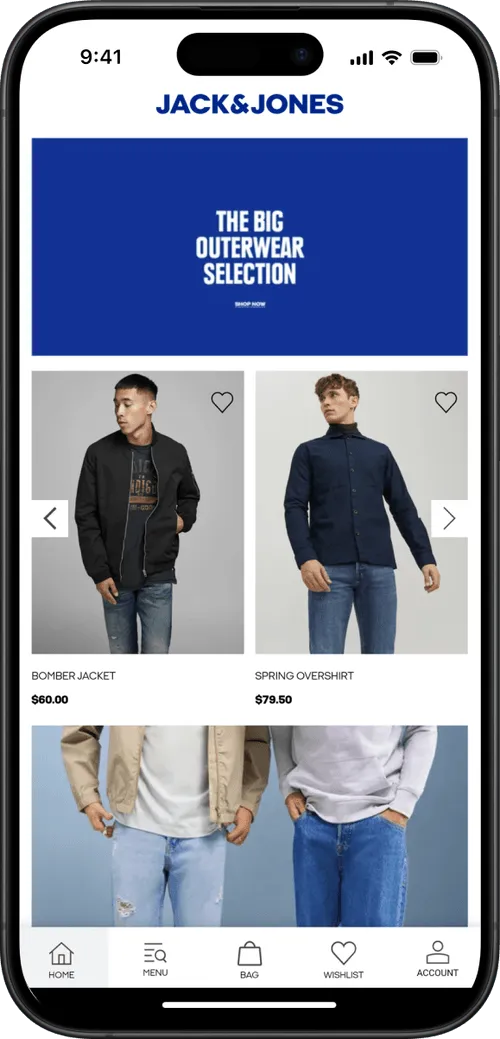
If you want to launch an app for your site, and it already looks and works great on mobile, a webview (wrapper) approach is often the most efficient way to do it.
You keep the site you have already invested in, and deliver it inside a native app shell.
Then you start reading about App Store rejection forum threads about "webview wrappers" getting rejected under Guideline 4.2 for "minimum functionality".
You feel stuck between two bad options: a six-figure custom build you do not need, or a cheap wrapper that gets rejected.
The fear is real, because Apple aggressively removes low-quality apps that feel like "web clippings".
However, Apple does not hate web technology, they hate poor user experiences. Thousands of major brands successfully use webviews. The difference lies entirely in execution.
In this guide, we explain exactly what Apple's reviewers look for and how to turn your site into an app that sails through approval, keeping all your existing site optimizations while adding a native app layer on top.
The "Webview Wrapper" Stigma
A webview is simply a browser engine embedded within an app.
Apps built around webviews can have a reputation for being lower quality, but that reputation comes from how they are sometimes used, not from the technology itself.
The stigma comes from the "gold rush" era, when spammers flooded the App Store with thousands of low-effort apps that did nothing but display a URL. These apps offered no value over a Safari bookmark.
To clean up the store, Apple cracked down. But it is crucial to distinguish between a "Lazy Wrapper" and a high-quality webview-based app.
- Lazy Wrapper: A generic container that effectively loads your website URL and does almost nothing else. There is no native integration. If your internet cuts out, you get a white screen. These get rejected.
- Webview-Based App with Native Layer: An app that uses webviews for core content such as catalog and checkout but surrounds them with native code. It has a native tab bar, manages push notifications, handles offline states, and communicates with the OS. This is the standard for modern convert website into webview app workflows.
Founders often confuse the two. Amazon, Instagram, and Basecamp all rely on webviews. The technology is not the problem, the lack of native "feel" is.
Understanding App Store Guideline 4.2
The rule that trips up most webview apps is Guideline 4.2: Minimum Functionality.
Apple’s official developer guidelines state:
"Your app should include features, content, and UI that elevate it beyond a repackaged website. If your app is not particularly useful, unique, or “app-like,” it doesn’t belong on the App Store."
In practice, reviewers reject apps that are "not sufficiently different from a mobile web browsing experience."
Related Rules
- Guideline 4.2.2: Apps should not be simple "web clippings" or content aggregators.
- Guideline 4.2.6: Apps built from templates must be submitted by the content owner. (This is why MobiLoud publishes apps under your Apple Developer account, keeping you compliant).
Why This Guideline Exists
Apple wants the App Store to be a premium ecosystem, not a list of bookmarks. Users expect apps to be responsive, with intuitive navigation and features they cannot get by typing a URL into Chrome.
Common Rejection Triggers
Reviewers spot "lazy wrappers" instantly by looking for:
- Browser UI: Loading bars that look like Safari or non-persistent logins.
- Lack of Native Navigation: Relying entirely on a web-based hamburger menu instead of a native tab bar.
- No Platform Features: Failure to use push notifications or location services.
- Empty States: Standard "You are offline" browser errors.
To pass App Store requirements and pitfalls, you must go deeper than just displaying HTML.
How to Ensure Your Webview App Gets Approved
You do not need to rewrite your site. You need to enhance the container it lives in.
By adding a cohesive layer of native functionality, you satisfy Guideline 4.2 while preserving every optimization, test, and tweak you have already made to your mobile site.
Strategy 1: Implement Native Navigation
Navigation is the biggest giveaway. In an app, users expect a persistent interface, not a browser back button.
.avif)
- Native Tab Bar: Use a bottom menu on iOS or side drawer on Android to switch between Home, Search, Cart, and Account.
- Native Headers: Keep the top navigation stable while web content scrolls.
- Native Transitions: Ensure page transitions feel smooth and screen based rather than like a page reload.
This tells the reviewer: "This is not just a website. It has its own app structure."
Strategy 2: Deep Integration with Device Capabilities
Apple expects meaningful use of device features. For ecommerce, one of the most powerful is push notifications.
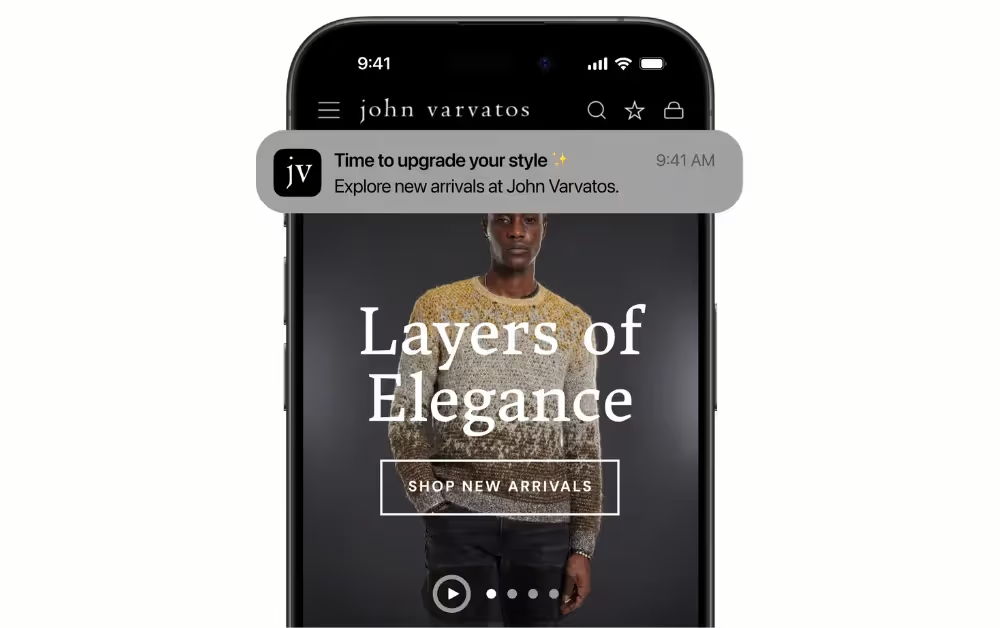
A mobile website cannot send reliable iOS push notifications. An app can.
By integrating a native push engine that ties into your CRM (like Klaviyo), you provide unique value and new revenue opportunities.
Go further with:
- Native Sharing and Camera: Use system tools for sharing, scanning, or uploading.
- Advanced Features for Custom Builds: For bespoke, heavily customized apps beyond what most platforms provide out of the box, teams can even explore features like biometric login (Face ID or Touch ID), which require additional native integrations and careful implementation.
Note: Simply bolting on push is not enough if the user experience still feels like Safari. Deep integration must pair with native navigation.
Strategy 3: User Experience Polish
Hide the fact that content is loading from the web:
- Splash Screens: Show a branded launch screen while data loads.
- Loading Indicators: Use native spinners, not browser progress bars.
- Error Handling: Create custom "No Internet" screens with "Retry" buttons.
- External Linking: Open third-party links in an in-app browser, keeping users inside your app.
If you’re shaping your UX around what Apple already approves, grab our webview conversion guide and model your app on proven patterns instead of guessing.
Why You Should Build an App (Despite the Hurdles)
The App Store approval hurdle is just a filter. Once you pass it, you unlock a superior channel for your best customers.
- Higher Revenue Per User: Mobile apps can convert significantly better than mobile websites, but the real power is not just a higher conversion rate. App users come back more often, view more products per session, and buy repeatedly, so your revenue per user grows over time.
- Retention Dominance: Users spend 90% of their mobile media time in apps. An icon on the home screen is a persistent reminder of your brand and a direct route to repeat purchases.
- Push Driven Engagement and Revenue: Push notifications often see much higher engagement than email and complement your email and SMS campaigns. Being able to reach customers instantly on their home screens for a flash sale or back in stock alert is a capability you do not get from mobile web alone.
Meeting Apple’s standards forces you to build a product customers actually want to use and gives your top customers a better, stickier way to buy from you.
Skip fragile DIY wrappers and six-figure rebuilds, turn your existing site into a compliant mobile app with MobiLoud.
The MobiLoud Approach: Guaranteed Approval
Using a DIY wrapper rolls the dice with Guideline 4.2. You are responsible for arguing with reviewers and fixing bugs.
MobiLoud is a full-service website to app platform that builds a native app experience on top of your existing site and guarantees App Store approval.
We have launched thousands of apps for major brands, refining a webview-based approach that consistently meets Apple’s criteria.
Our platform provides the required native layer:
- Native Navigation: We configure native tab bars and menus that integrate tightly with your site structure.
- Powerful Push: We integrate with OneSignal and your marketing stack for unlimited notifications.
- Technical Compliance: We handle the binary build, certificates, and submission using the correct WebKit framework.
- Reviewer Communication: We answer Apple’s questions using proven phrasing. We ensure specific compliance with web clipping and app-generation rules.
We do not just "wrap" your site. We fuse it with a native app shell to create a full-featured, native-feeling mobile app. You get guaranteed App Store approval without writing code, while keeping the site you have already invested in as the core of your experience.
Want to see what that looks like in practice? Browse real apps built with MobiLoud to see how they look and feel like any other high-quality native app.
Final Thoughts
Guideline 4.2 is a barrier for spammers, not businesses. Apple approves webview-based apps that offer distinct, high-quality experiences.
The secret is embracing native features like persistent navigation, push notifications, and polished offline handling so your app feels clearly different from a simple mobile website.
You can build this yourself with a team of engineers, or partner with MobiLoud.
We help you use the site you already have, layer on a native app experience that meets Apple’s criteria, and launch a mobile app your best customers will keep coming back to.
Ready to get your brand on the App Store? Book a demo with us today.
FAQs

Convert your website into a mobile app