How to Turn Your Website into a Mobile App (2026 Guide)

Yes, you can convert your website into a mobile app. The real question isn't whether it's possible. It's how to do it, because "converting a website to an app" can mean a number of very different things. For a small publisher, a no-code app builder is the perfect way to do it. For a mid-market or enterprise ecommerce brand, a custom app service like MobiLoud is the best option. We explain the best fit for every kind of project below.
Yes, you can convert your website into a mobile app. The real question isn't whether it's possible. It's how to do it, because "converting a website to an app" can mean a number of very different things. For a small publisher, a no-code app builder is the perfect way to do it. For a mid-market or enterprise ecommerce brand, a custom app service like MobiLoud is the best option. We explain the best fit for every kind of project below.
Mobile apps are the most powerful brand asset that many web-first businesses still don’t have.
You’ve got your site. You’ve got your social profiles. You have your email list. Why don’t you have an app yet?
Most of the time, it’s because you don’t realize how easy it is to convert a website into an app.
From no-code tools to cross-platform frameworks, there are a huge number of ways to launch an app for your website. And no matter your scale, your budget, or the type of website you run, there’s likely an option that’s a perfect fit for what you’re trying to achieve.
This guide walks through what "convert" really means in this context, why brands are doing it now, what every approach has to handle behind the scenes, and which path is the right one for your kind of site.
What It Means to "Converting a Website Into an App"
The phrase "convert a website into an app" covers a much wider range than most people realize.
Before you start asking how to turn your website into an app, you need to answer a few questions.
The first is whether you want a companion app or a replacement app.
Most of the time, you’ll want to launch an app alongside your website, rather than instead of it. Your website still does the heavy lifting for SEO, marketing pages, blog content, and first-time visitors. The app is another surface, designed to build a higher-frequency relationship with repeat customers, readers or users.
Only a small minority of cases (single-purpose tools, internal apps, or businesses going app-first by design) replace the website entirely. Knowing which one you're after is the first fork in the road.
The second is whether you mean a native app, a progressive web app, or a hybrid.
- A native app lives on the App Store and Google Play, sits on the customer's home screen, and can send push notifications through the operating system.
- A progressive web app, or PWA, is a website built to behave more like an app: installable to the home screen, capable of working offline, and faster than a typical mobile site, but with no App Store presence.
- Hybrid apps sit somewhere in between, with native code on the outside and web technology powering large parts of the interior.
Each makes very different tradeoffs on capability, discoverability, and cost.
Read more about the difference between native, web and hybrid apps in this article.
The third is whether you're going to build it or buy it.
- Building means a development team writes the app from scratch, often with React Native or Flutter, or Swift and Kotlin for fully native.
- Buying means you “buy” a software or service that does it for you.
The build-or-buy decision drives both the cost and the timeline more than any other choice in the project.
Dive deeper into the build vs buy conversation, for ecommerce apps specifically, in this article.
Once you've answered those three questions, you’ll have a better understanding of the right way to approach your project.
Why Brands Are Converting Their Sites Into Apps
The honest version of the "why" is short. Mobile is now the dominant surface in online business: Adobe Digital Insights pegged mobile at 51.4% of US online spend in October 2025, up 11.6% year over year.
Mobile users spent an average of 3.5 hours a day inside mobile apps in 2025, with mobile web sessions much shorter and less frequent. A website on a phone is a worse touchpoint than an app on the same phone, for the same customer.
A mobile app is a closer connection, often with your best customer.
Someone who downloads your app is your regular customer, who buys from your store once a month. It’s the person who reads your content every morning with their coffee. It’s the power user who can’t get enough of your app.
An app is a stronger touchpoint (a benefit for you) and a more convenient way to interact with your site (a benefit for them).
It’s also a strong authority signal for your brand, something that’s becoming increasingly important with the amount of content and noise online right now.
What's Involved in Turning a Website to an App
Every path to an app, no matter who builds it, has to handle the same underlying set of components.
Sometimes that work is invisible to you because a vendor is doing it. Sometimes you're paying for it directly.
Knowing what's involved is what makes the path comparison meaningful.
Native UI Elements
Apps need things that websites don't have.
- A launch screen.
- A bottom tab bar and hamburger menu tuned for thumb reach.
- A home tab built around browsing patterns specific to a small screen with no URL bar.
- Account and profile screens, settings, an in-app cart that feels native, gesture handling for swipes and taps.
None of that comes for free from the website, even if most of the content inside those native screens is being pulled from the web.

Look at any well-built ecommerce app, and the navigation usually diverges from the website's.
- Sephora's app leads with the loyalty program; the website leads with category browsing.
- Nike's app pushes you toward member content; the website pushes you toward the latest drop.
In most cases, the app isn't a one-to-one copy of the site, and pretending it is produces a worse app.
App Stores
Part of the reason to turn your website into an app is to get into the Apple App Store and Google Play Store.
That means shipping an app that complies with their rules and regulations.
Both Apple and Google review every app before it goes live, and they're not symmetric about it. Apple is the stricter reviewer, and the reasons for rejection are public: App Store Review Guideline 4.2 covers minimum functionality, 4.3 covers spam and repackaged content, plus payment compliance, privacy disclosures, age ratings, and a long list of more specific issues.
Apple's review can take days to weeks, and rejections require a re-submission cycle. There are some costs attached: an Apple Developer Program account at $99 a year and a Google Play Developer account at a $25 one-time fee (small relative to the build, but worth knowing they exist).

Push Notifications
A lot of the time, push notifications are the single biggest reason to launch an app in the first place.
Push notifications land directly on the lock screen of a customer's phone, in real time, and are free to send, with no inbox to compete with and no algorithm in the middle.
.webp)
Push runs on backend infrastructure (Apple's APNs for iOS, Firebase Cloud Messaging for Android), normally accessed through a service like OneSignal or Klaviyo.
If you’re launching a mobile app, you need push set up. You need a way to compose messages, segment them by behavior or attributes, schedule them around purchase cycles, and measure delivery and response.
Ongoing Maintenance
One more thing to understand about mobile apps is that they’re not a “one and done” project.
It might seem that way. Build the app, launch it, and it’s done. But that’s not the reality.
The reality is that Apple ships a major iOS version every September, Google ships Android updates throughout the year, and both regularly tighten the App Store rules and the SDK requirements.
There are also changes to your website that affect the app, as well as third-party integrations connected in your app. If your app isn’t regularly maintained, it’ll eventually break, and you’ll gradually lose all your users (and accumulate negative reviews on the app stores).
Five Different Ways to Convert a Website Into an App
Turning your website into an app, as we’ve established, can look very different from project to project.
We can lump them all together into five broad categories - covering different types of app, and different approaches to building your app. Let’s run through them now.
Progressive Web Apps (PWAs)
A progressive web app is a website built to feel more like an app. With the help of service workers, an app manifest, and HTTPS, a PWA can be installed to the home screen, work offline, and load faster than a typical mobile website.
It’s a mature technology, and building a PWA is mostly just an extension of your web codebase, using the same frameworks and developers you already have.
For a small business with a modern responsive site already in place, adding PWA support is one of the cheaper ways to give customers something that approximates an app experience.
The catch is that a PWA isn’t a “real” mobile app in every sense of the word. You’re not going to get it in the App Store, it’s not as intuitive to install, and a PWA has limited use of push notifications.
It’s the fastest way to turn your website into an app, but the least comprehensive.
General-Purpose No-Code App Builders
No-code app builders like Glide, Adalo, Bubble, and Thunkable let you build a mobile app by configuring templates, dragging and dropping components, and connecting to a database.
There's no coding required, the learning curve is usually pretty quick, and the cost is a recurring subscription that typically runs anywhere from around $25 to a few hundred dollars a month.
The problem with these kind of app builders is that they don’t integrate or sync with your website very well. They’re made for launching standalone apps, not specifically for converting a site into an app.
They’re an option for simple content sites, or if your goal is an app that replaces your website. If you’re maintaining a more complex website and an app in parallel, this approach might not be the best.
No-Code Ecommerce App Builders
For small ecommerce brands, no-code tools like Tapcart, Shopney, and the hundreds of other tools on the Shopify App Store (and other platform extension/plugin marketplaces) are a better way to convert your site into an app.
They work like the no-code tools above; but are built to integrate with your ecommerce backend via platform APIs.
This makes it much easier to maintain an app and a website in parallel - as you need to do if you’re running an ecommerce brand.
This approach can feel limiting for higher-end brands with more complex websites, as well as non-Shopify brands (for whom there’s a much smaller selection of compatible tools available). But they’re a great, cost-effective website to app conversion tool for SMBs and straightforward ecommerce storefronts.
Custom Development
On the far end of the spectrum to no-code tools is the custom development approach.
This is what you think of when you think about launching a mobile app. Custom code, written for mobile, with custom connectors that link and share data between your website and app.
Within this category, there are a range of complexities too:
- Fully native development: completely separate codebases, usually written in Swift (for iOS) and Kotlin or Java (for Android)
- Cross-platform development: frameworks like React Native and Flutter that let you use the same codebase across iOS and Android.
- Hybrid app development: frameworks like Ionic that bridge web and mobile code, and allow you to convert some web elements directly to the app.
Whichever way you do it, it’s going to be a lot of work. Custom development requires specialist developers, and a lot of parallel work to keep your website and app in sync.
A fully custom native or cross-platform app is #1 for performance, but also #1 (by a mile) for investment.
MobiLoud
MobiLoud is a little bit of several different approaches, so it deserves its own category.
MobiLoud is a custom app service made specifically for converting complex ecommerce websites into mobile apps.
Examples include:
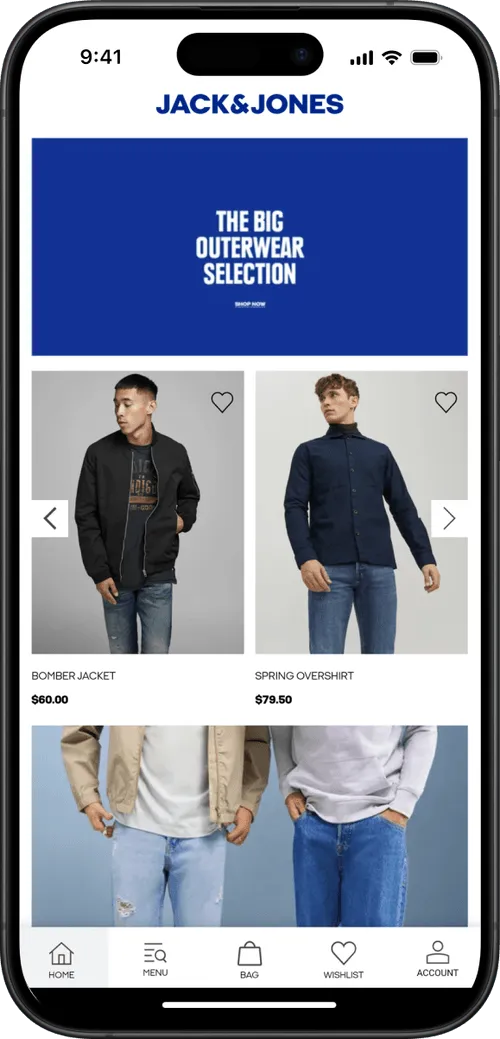
- The BESTSELLER apps (Jack & Jones, ONLY, Vero Moda) and John Varvatos - all running on bespoke Salesforce Commerce Cloud builds.
- Tadashi Shoji - a unique luxury fashion label built on Magento/Adobe Commerce.
- Pharmazone - an online pharmacy built on Shopify, but with real complexity on the backend, non-standard features and a high compliance bar.
.webp)
It’s a step above no-code ecommerce app builders. It serves a similar purpose: converting ecommerce websites into mobile apps.
But instead of a templated, DIY tool, MobiLoud is a service built to help high-end brands launch (and maintain) custom mobile apps. It’s an easier alternative to custom mobile app development, and for mid-market and enterprise ecommerce brands, the best way to turn their website into a high-performance mobile app.
Which Website to App Approach Is Right for Your Site?
The best way to go from website to app depends on the type of site you’re running. One answer could not possibly cover every single use case out there.
Here are our recommendations for a few different business types.
Small or Standard Shopify Store
If you run a Shopify store under roughly $1-2 million in annual revenue, on standard Shopify (not Shopify Plus), with a relatively stock configuration and no heavy theme customizations, your best path is likely one of the Shopify-specific app builders.
There are close to a hundred mobile app builders listed in the Shopify App Store, all built for a quick, relatively painless app launch.
Read our Shopify mobile app development guide for a more extensive look at how to turn a Shopify site into a mobile app.
Mid-Market or Enterprise Ecommerce
If you're past the small-Shopify tier, MobiLoud is the best way to launch a mobile app.
This means brands on Shopify Plus, BigCommerce Enterprise, Magento or Adobe Commerce, Salesforce Commerce Cloud, custom or headless storefronts; brands with multi-region setups, B2B alongside DTC, complex integrations, or heavy customizations.
For complex, high-end brands, the limitations of no-code app builders are more evident. Custom development still isn’t the ideal solution, as this approach brings a huge amount of operational overhead (not to mention six figures plus in annual development costs).
MobiLoud strikes the perfect balance between simplicity and flexibility - letting you launch the perfect mobile app without the tax of custom development.
"We tried six companies and I feel like you guys have the best combination of service, functionality, and price."
-- Kenneth Chan, Founder & CEO, TOBI
News, Blog, or Publisher Site
If you run a content site (magazine, newspaper, multi-author blog, podcast network, niche publication), there are some publisher-specific no-code tools that are suitable ways to build an app.
Some general-purpose no-code tools (Glide, Bubble) may also fit, as long as they offer strong integrations with your web platform, so new content shows up in the app automatically.
The goal is something with low overhead, a seamless integration with your content, and a fast UI that elevates your reader experience.
Web App or SaaS Product
Launching a mobile app companion for a web app or SaaS can be tricky.
It depends largely on what you’re trying to do. If your web app already does what you want the mobile app to do, a PWA may be enough. Alternatively, you might want to use a wrapper tool to convert your existing web app into something users can run directly on their phones.
If you need more functionality, and you have the dev resources, a custom Ionic build is a strong option.
If your vision for the mobile app is something significantly different to what the web app does, a custom build is likely your only option. Depending how mission-critical the mobile app is, a React Native/Flutter build may be the only way to go.
Marketplace or Multi-Vendor Platform
If you run an online marketplace (multi-vendor commerce, peer-to-peer, multi-sided platform), MobiLoud is likely the best option.
MobiLoud will let you launch an app that runs on the same backend as your web platform. You can have buyer and seller accounts logging in separately, yet through the same app. Everything that works on the web will work in the app.
If you’re building the next Airbnb or eBay, MobiLoud can help you (while no-code ecommerce app builders are unlikely to be able to handle the complexity). The alternative is custom development; which may be suitable if you’re app-first, and have the capital to sustain everything that goes into a custom native app.
Small Business, Portfolio, or Brochure Site
If your website isn't a transactional store (service business, portfolio, local business, personal brand, brochure site), the right path is the cheapest one that works.
A PWA gives you an installable, app-like mobile experience without the App Store overhead, for very little money. A no-code app builder like Bubble or Glide gets you an actual App Store listing if Apple and Google presence matter for trust or discoverability, at a low monthly fee.
The Bottom Line on Converting Your Website to an App
If you have a website that works well on mobile browsers, with a lot of mobile users, and natural repeat usage patterns, converting your site into a mobile app is one of the best things you can do to increase retention and build a stronger business.
The world today is mobile-first. We’re doing more on our phones, we trust mobile more for large purchases and important actions, and brands that offer their regular customers a mobile app are winning the retention battle over the competition.
Whether you’re running a news site, a SaaS app, a small ecommerce store or a global enterprise ecommerce brand, you should probably have a mobile app.
At MobiLoud, we’ve been helping online brands launch mobile apps for over 10 years, so we know exactly what it takes to launch a successful mobile app.
If you’re running an ecommerce brand, and curious about the best way to launch an app for your store, get in touch. Book a consultation and we’ll discuss what you’re looking to do, where your business is at, and whether MobiLoud is the right pathway for you to launch a custom mobile app.
FAQs

Convert your website into a mobile app